Portfolio

Make Words Count

For 13+ years, I’ve built content systems for products used by billions, treating conversation as the fundamental thread that connects us all. From leading the redesign of flagship products like Gmail across 7 pillars (alongside 17+ designers and 10 researchers) to driving a 25% registration lift at Allrecipes and localizing beloved Nintendo titles, I specialize in creating useful, honest, and human experiences.

My Work at Google: Flagship Products & Systems

Sunnyvale, CA • Aug 2016 – Sep 2022 • Previously: michaelar@

Google • Gmail & Workspace Gmail Hub Integrated Workspace UI showing Mail, Chat, Rooms, and Meet
Product Redesign + Onboarding: The Next Generation of Gmail (“Hub”)

Role In-house as Lead UX Writer for “Hub” at Google (7 pillars • 17+ designers & 10 researchers)

The work Content strategy across Gmail, Chat, Spaces, G Suite Search/Assistant, 3P apps, Meet, & Lattice; splash onboarding, verb-oriented navigation, & Smart Canvas Mail Merge

Impact Unified Mail, Chat, Rooms, and Meet for 1.5 billion users; splash onboarding combining UXW tactics with marketing sizzle tested exceptionally well in biweeklies.

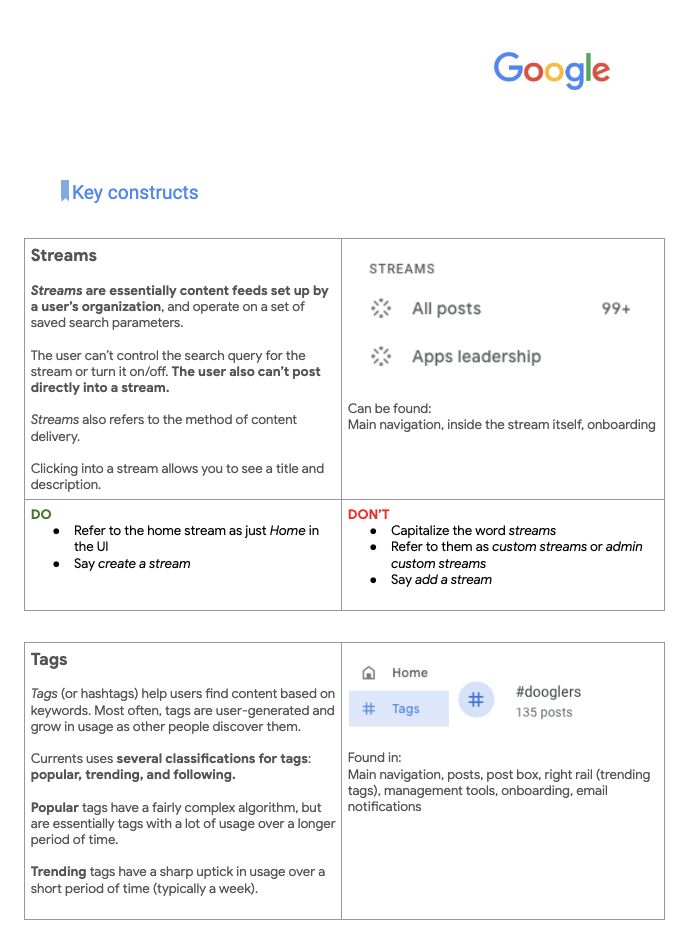
Google • Systems Thinking Currents UX/UI Writing Guide Key Constructs page

Systems Thinking + Governance: The Currents UX/UI Writing Guide

Role In-house as Senior UX Writer at Google (Currents & Google+, Aug 2016 – Jul 2019)

The work Authored a comprehensive 22-page UX/UI style guide (go/currents-writing), Voice = Climate / Tone = Weather framework, 50+ term glossary, and Greenlines accessibility guidance

Impact Built the “connective tissue” that helped teams scale self-service consistency across G Suite while supporting 9M+ visually impaired screen-reader users.

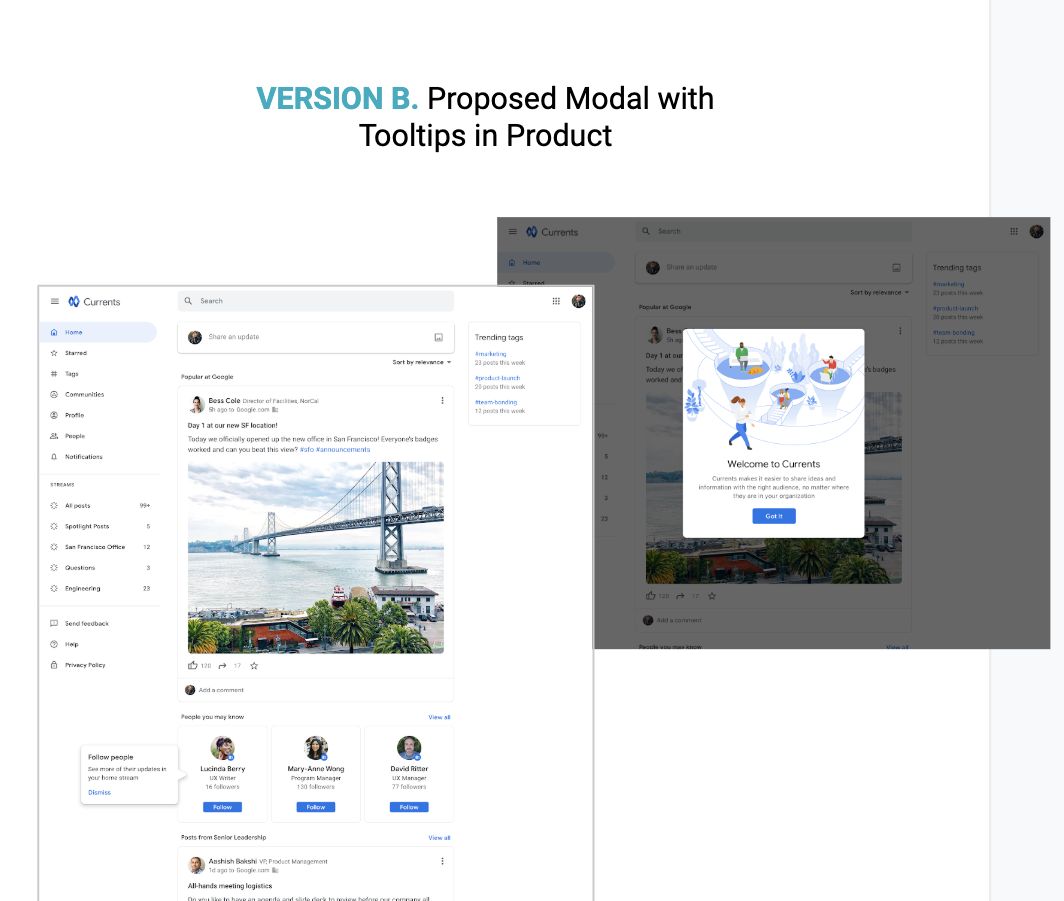
Google • Currents Currents contextual onboarding modal and tooltips

Product Positioning + IA: Currents Onboarding, “Streams”, Tags & Empty States

Role In-house as Senior UX Writer at Google (Currents, Aug 2016 – Jul 2019)

The work UXR/UXW vision deck, progressive onboarding, Spark naming workshops (Streams), Active Tags exploration, and End-of-Stream / Empty States taxonomy (Browsing vs. Seeking)

Impact Contextual onboarding was preferred by 80% of test participants, and the vision matrix became the foundation for official Google Cloud marketing assets.

Google Chat Threading + History, Lifecycle Comms & 20% Projects

Complex State Systems, Crisis Management & Conversational AI
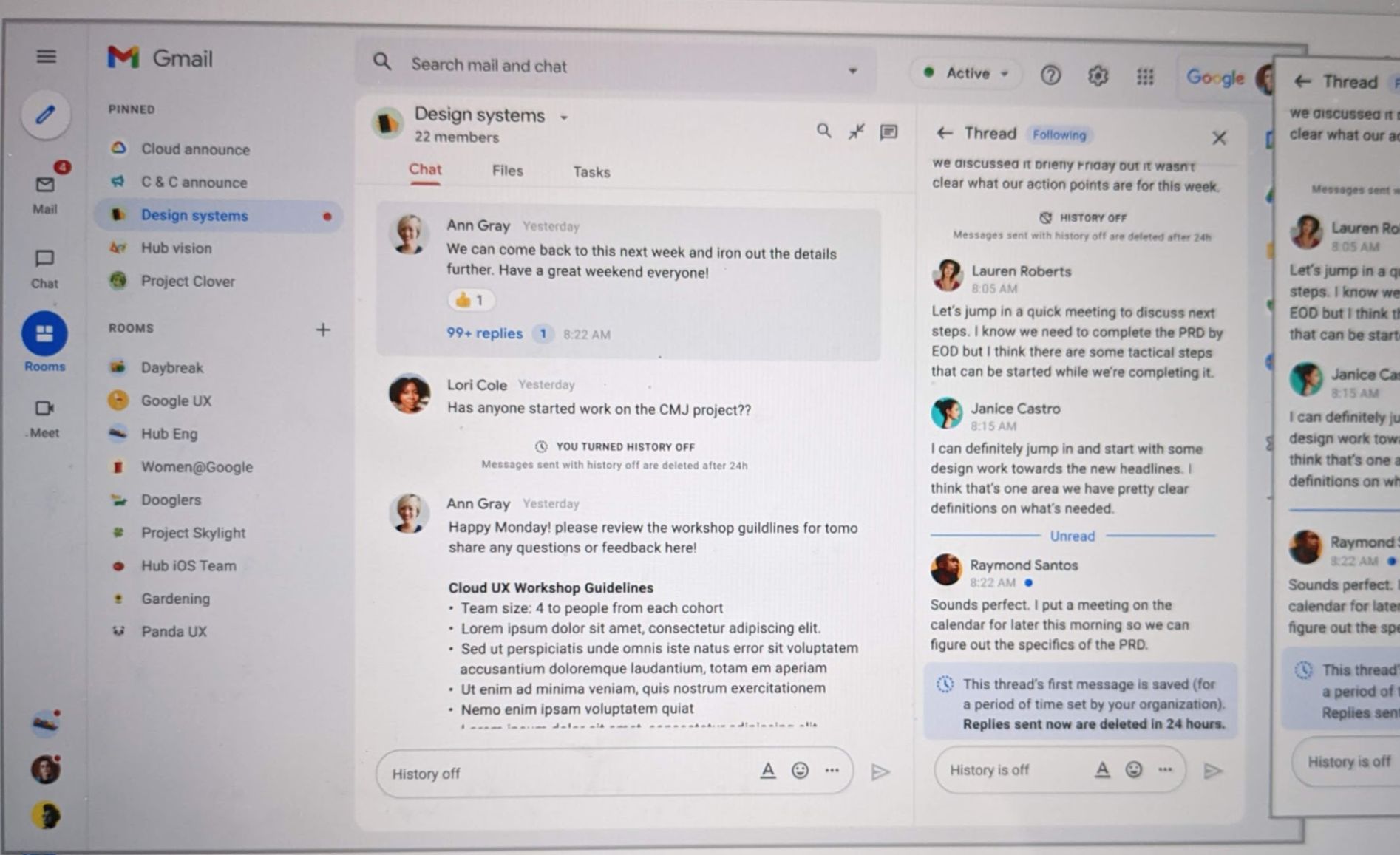
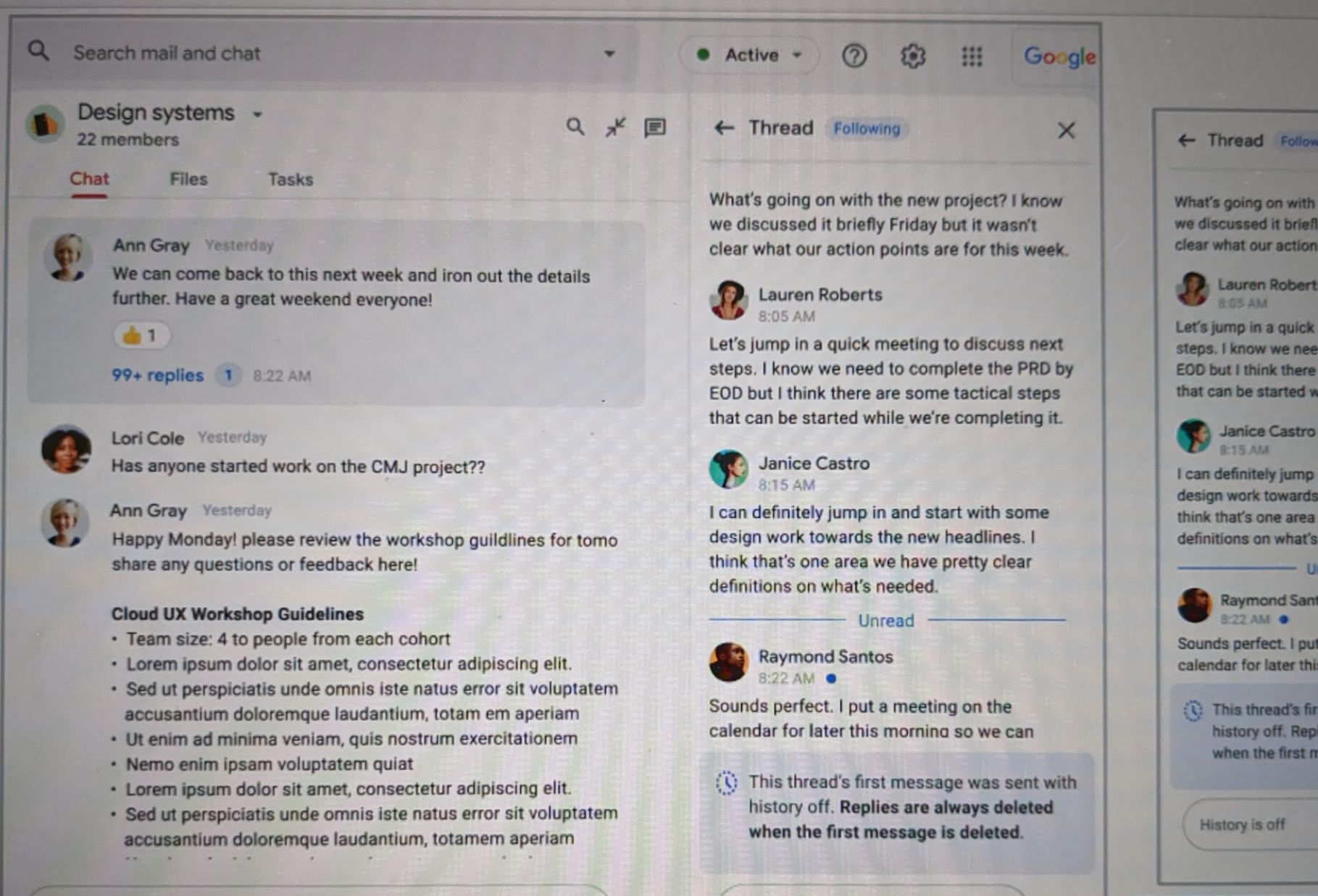
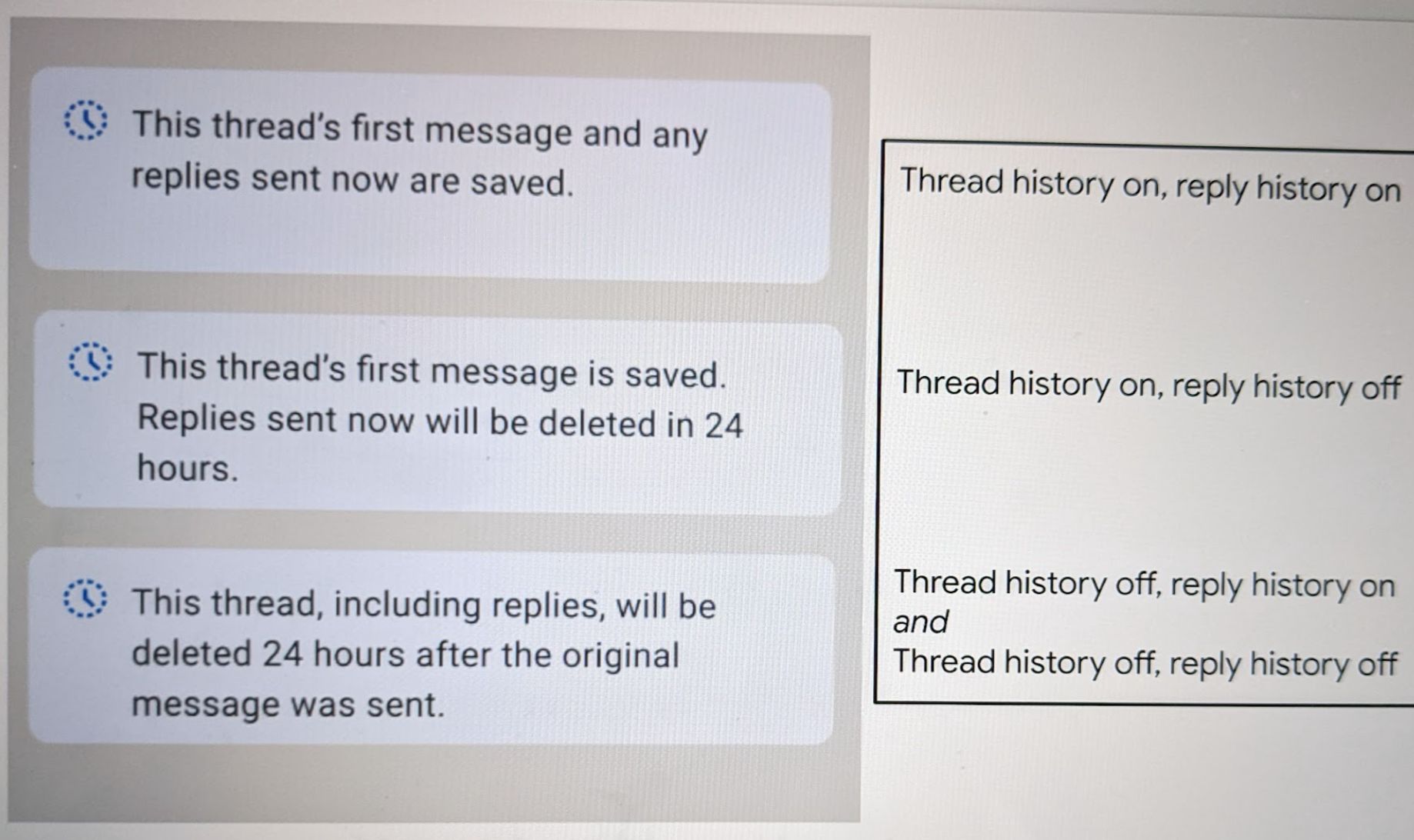
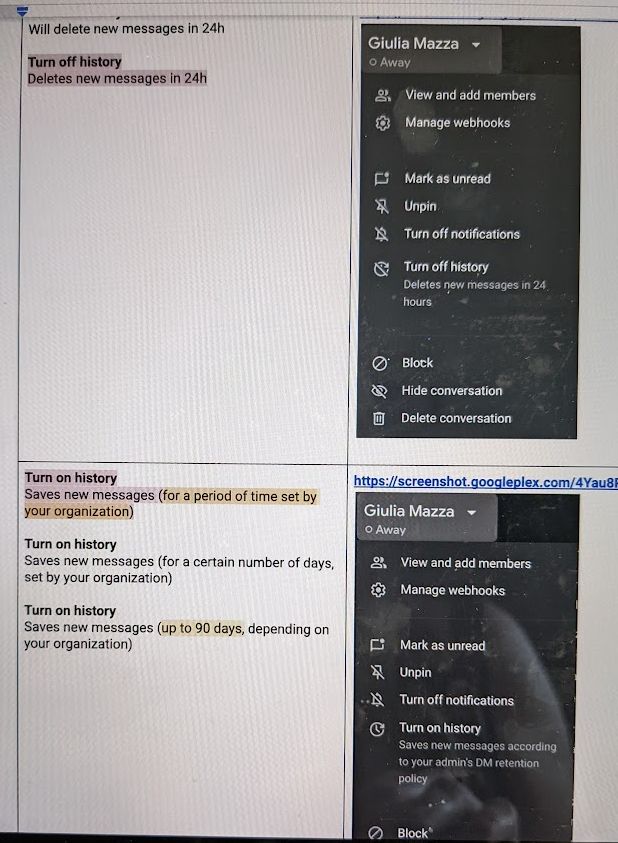
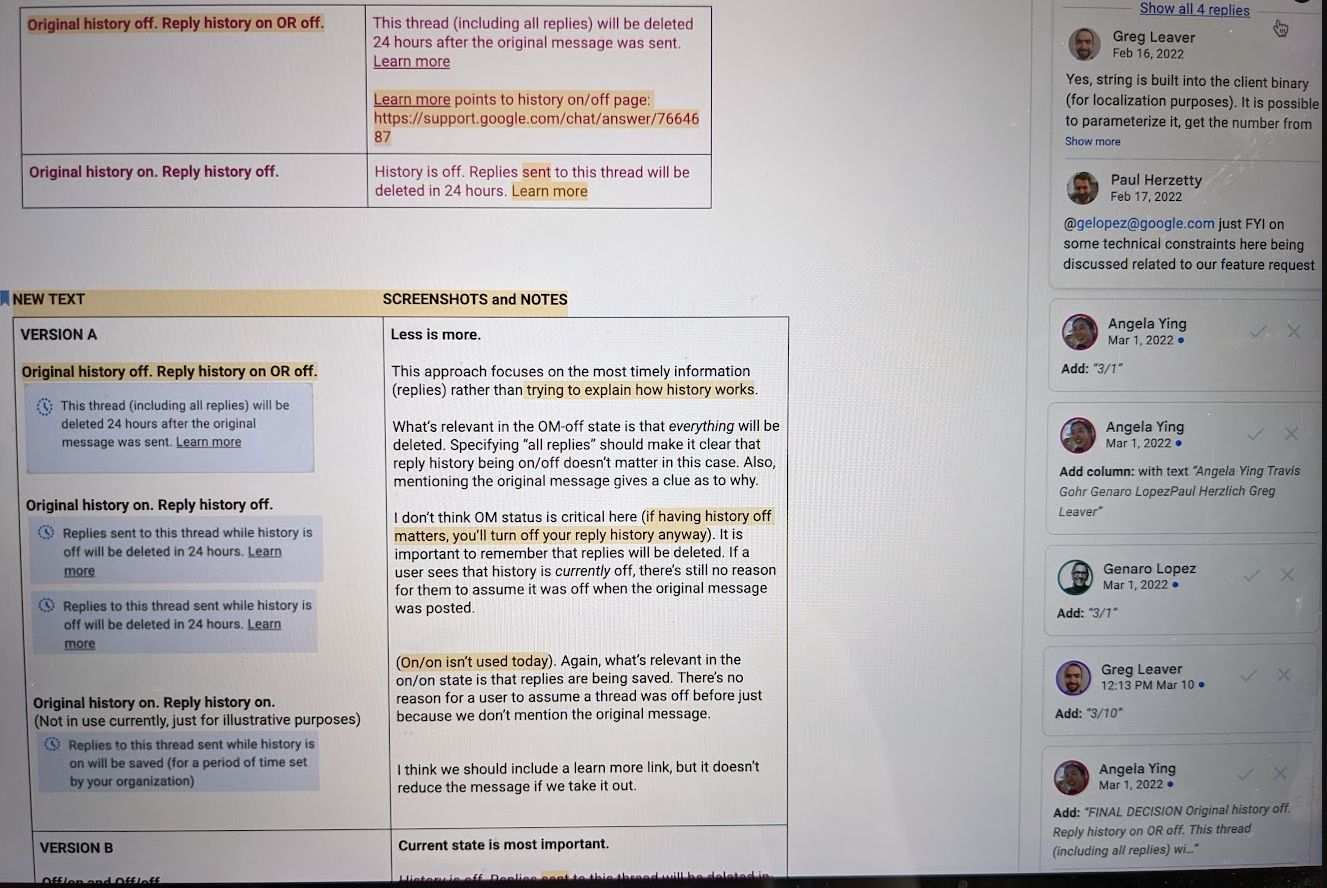
Google Chat • Dasher (2022) Google Chat Threading and History Addendums UI in Gmail

Complex State UXW: Google Chat Threading + History Addendums & Marketplace

Role In-house as UX Writer for Google Chat & Gmail Hub (2018 – 2022)

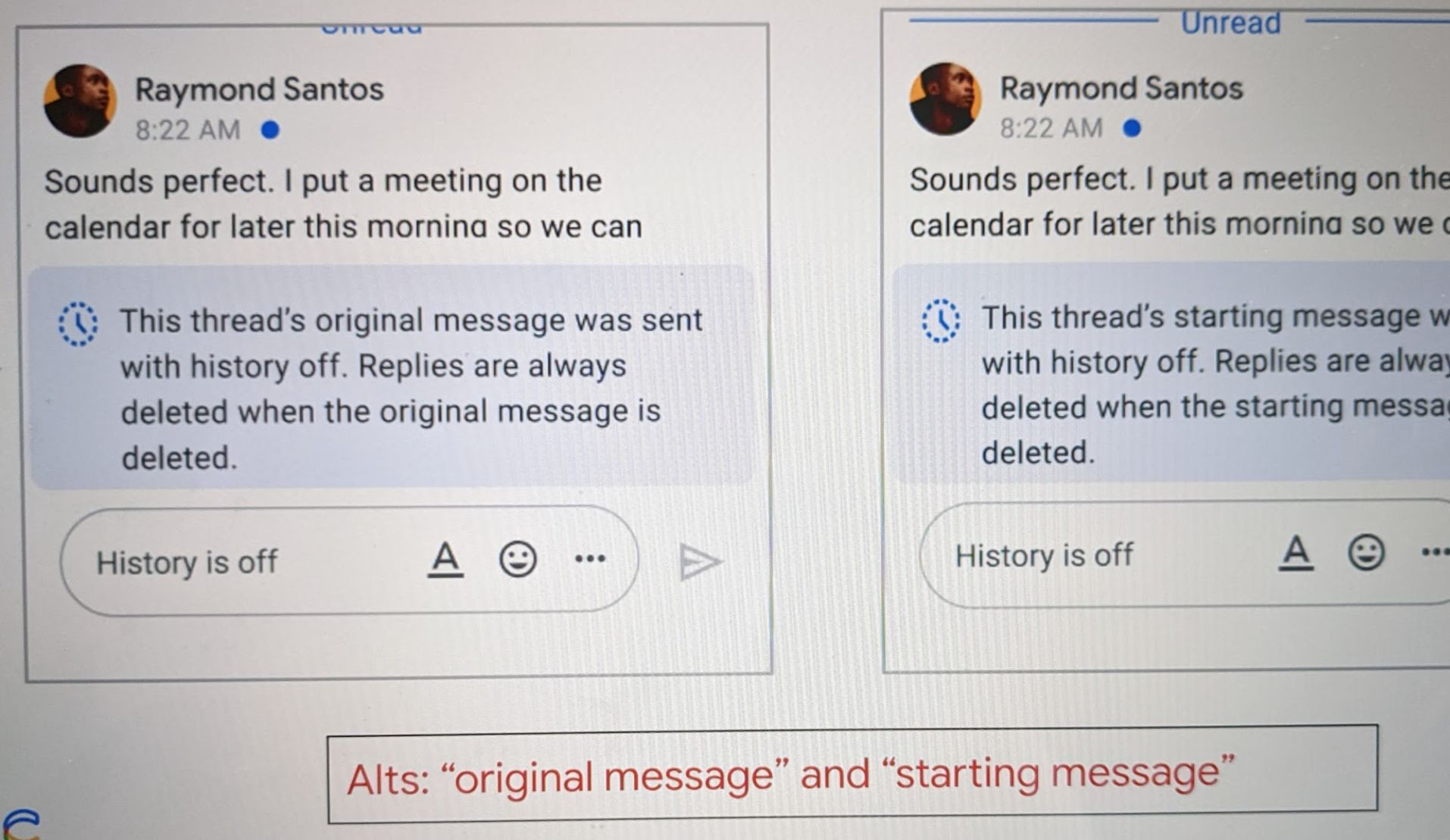
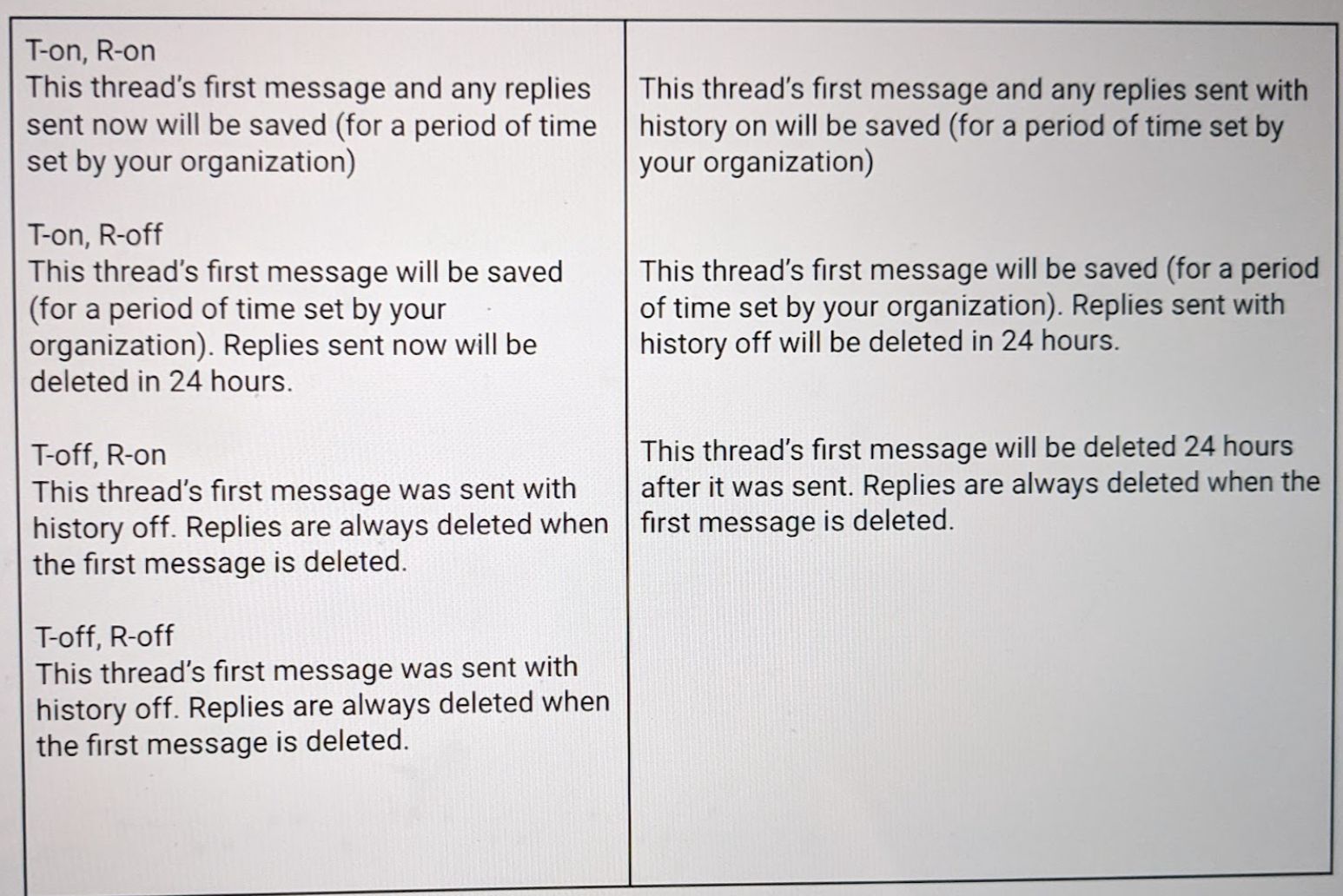
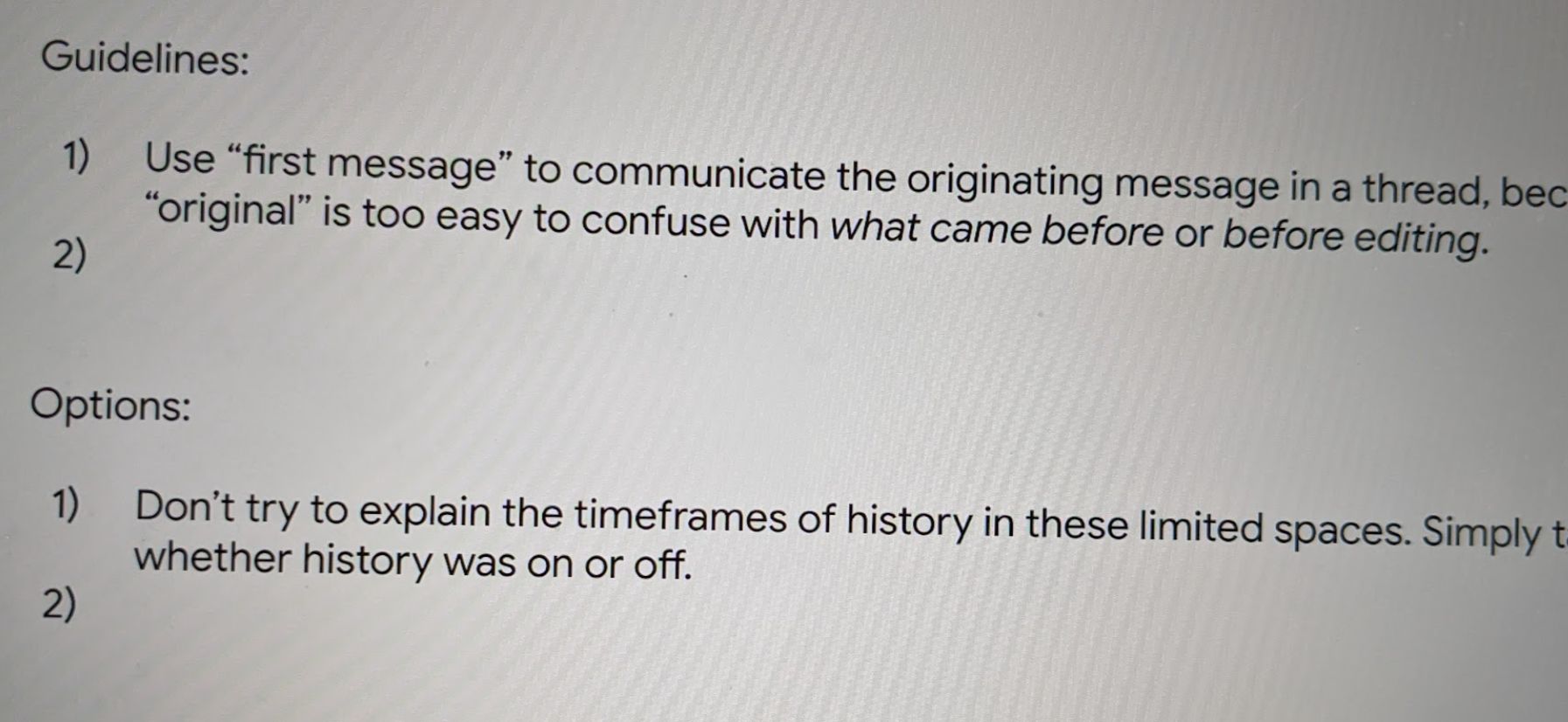
The work Untangling 4-state Threading + History combinations (Original/First message On/Off × Reply On/Off), Top Menu toggles, Presence (Do not disturb), & 3P Marketplace apps

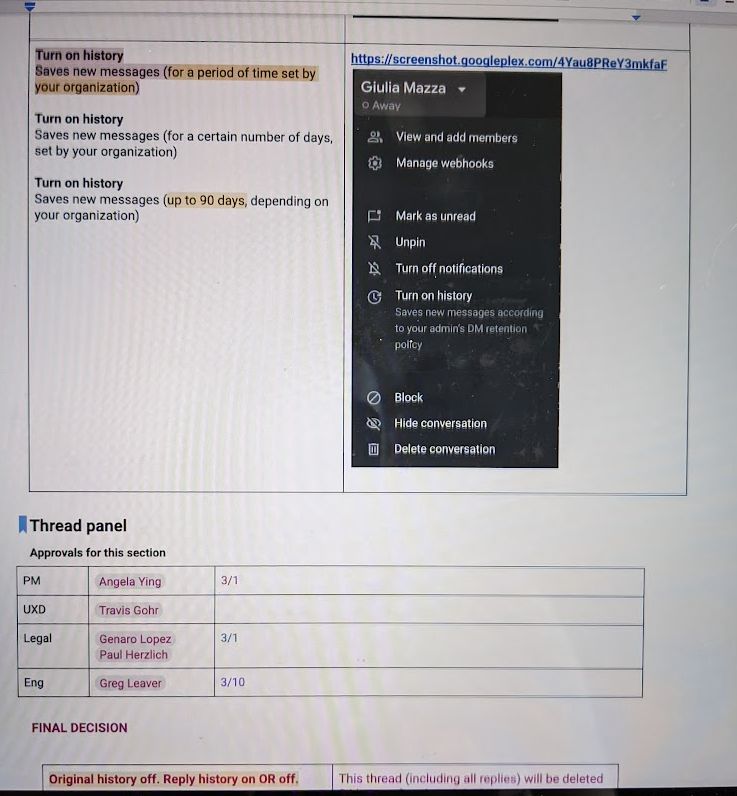
Impact Drove cross-functional sign-off across PM, UXD, Legal, and Eng to turn “supremely confusing” 24-hour deletion & org retention states into crystal-clear microcopy.

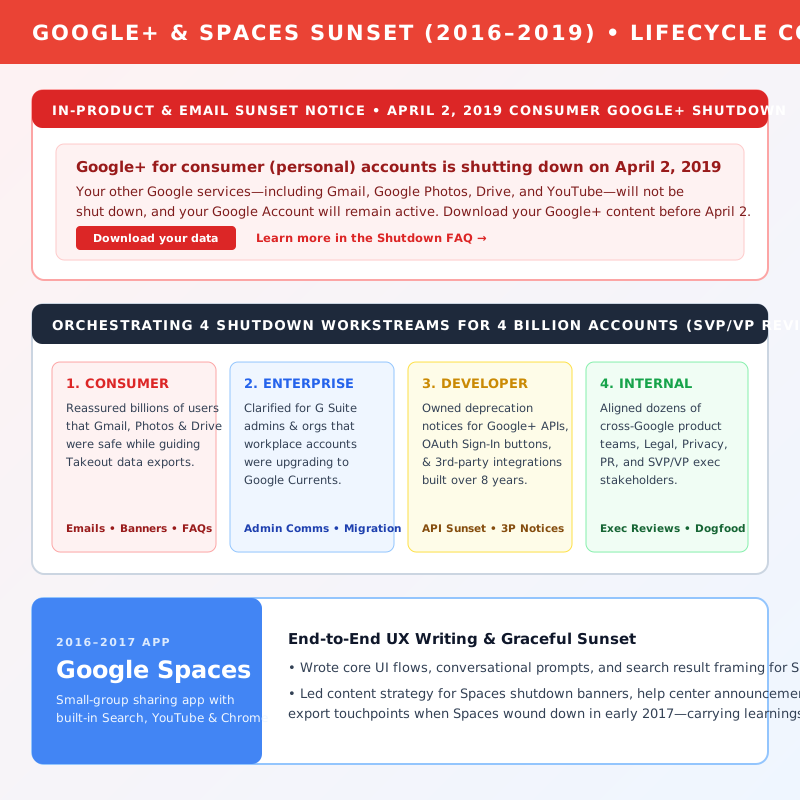
Google+ & Spaces Google+ Consumer Shutdown Banner and 4-Workstream Matrix

Product Lifecycle + Crisis Comms: Shutting Down Consumer Google+ & Spaces

Role In-house as Lead Shutdown UX Writer at Google (2016 – 2019)

The work Owned product comms for the shutdown of consumer Google+ (months of emails, banners, posts, and FAQs) across 4 workstreams (Consumer, Enterprise, Developer, Internal)

Impact Guided 4 billion accounts through an 8-year integrated product sunset with grace and sensitivity, securing alignment across dozens of stakeholders up to the SVP/VP level.

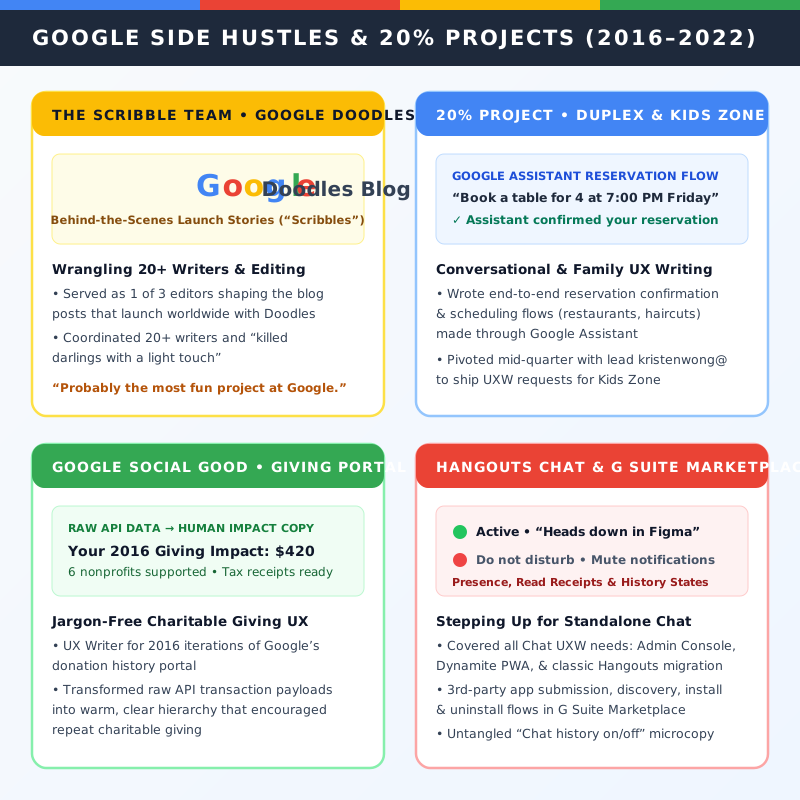
Google 20% Projects Google Side Hustles: The Scribble Team Doodles, Duplex Assistant, and Social Good

Conversational AI + Editorial: Duplex (I/O ’19), Google Doodles & Social Good

Role In-house as UX Writer & Scribble Team Editor at Google (2016 – 2020)

The work Duplex automated calling reservation UXW in Google Assistant + Kids Zone; guiding 20+ volunteer writers on Google Doodle “Scribbles”; 2016 Donation History Portal

Impact Shipped conversational AI booking flows announced at I/O 2019, kept 20+ Doodle writers on topic and on brand, and turned raw API data into warm charitable giving copy.

Life Before Free Kombucha Google: Allrecipes, Nintendo & WildTangent

Seattle & Redmond, WA • 2007 – 2016
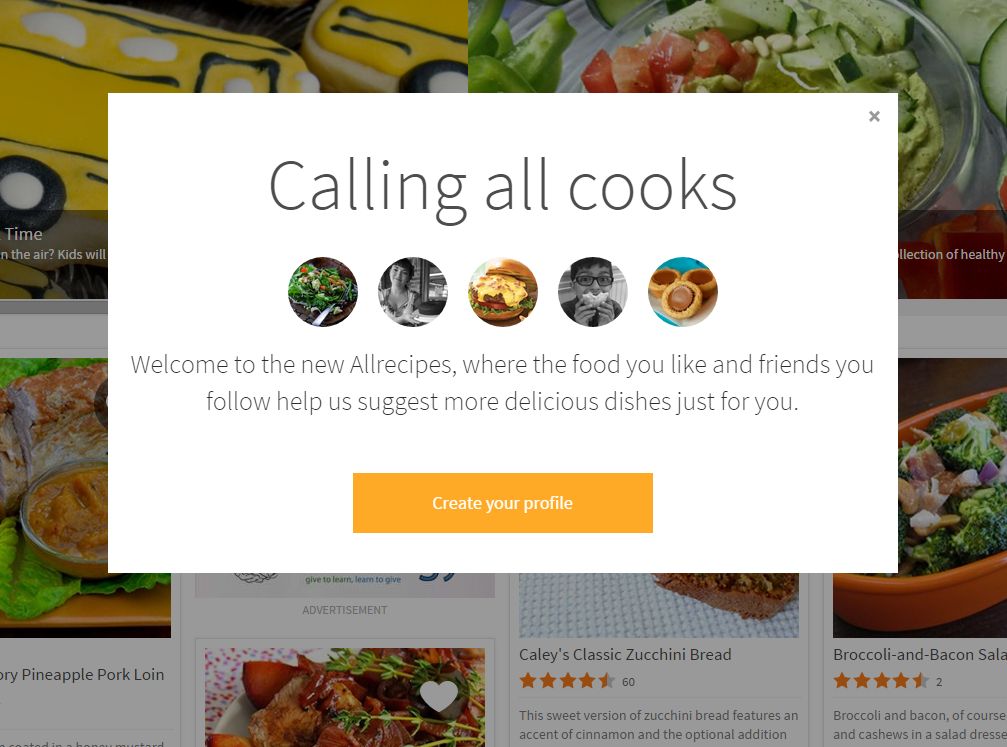
Allrecipes • 2013–2016 Allrecipes Calling All Cooks Onboarding Overlay and Registration Redesign

Conversion UX + Redesign: Allrecipes (+25% Sign-Up Lift), Overlays & Dinner Spinner

Role In-house as Senior UI/UX Writer at Allrecipes (Seattle, WA • Sep 2013 – Apr 2016)

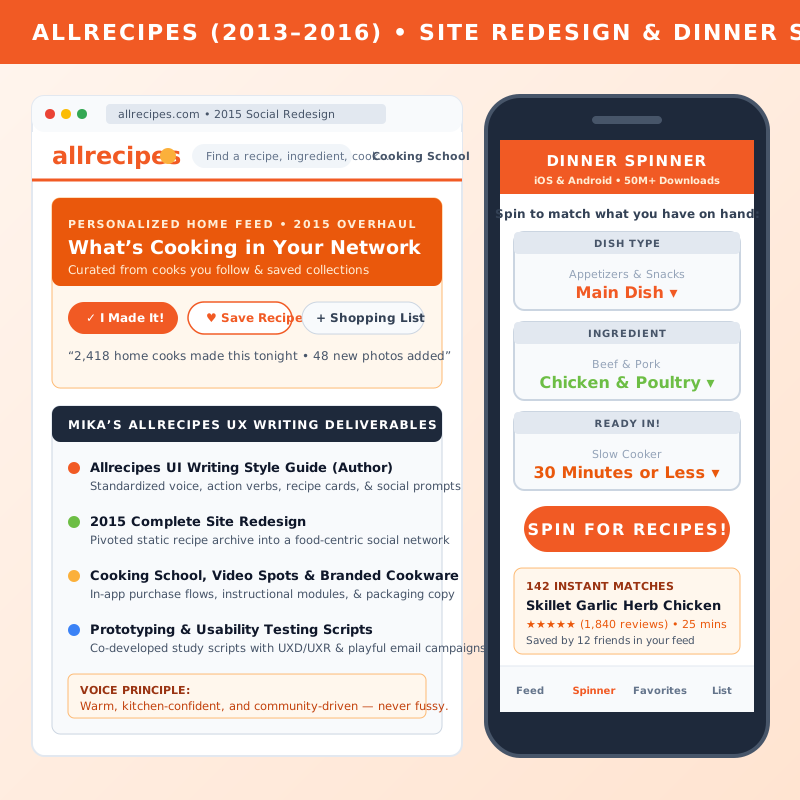
The work Complete 2015 site redesign, registration CTA A/B testing, onboarding overlays, Dinner Spinner iOS/Android, Allrecipes UI Style Guide, & A/B-tested email campaigns

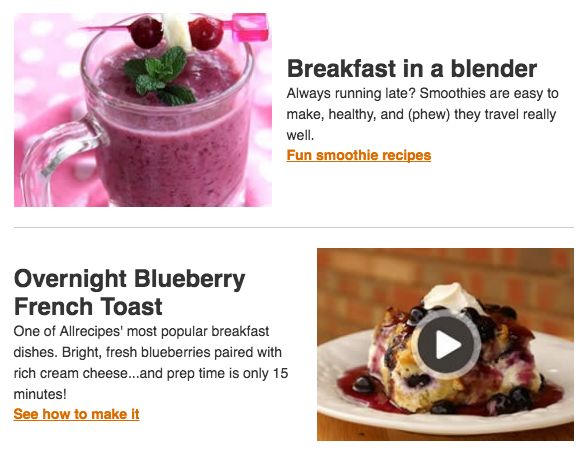
Impact Achieved a 25% lift in registration starts for anonymous users and a 27.47% open rate / 17.77% CTR across 4.17M recipients on the Breakfast Email Campaign.

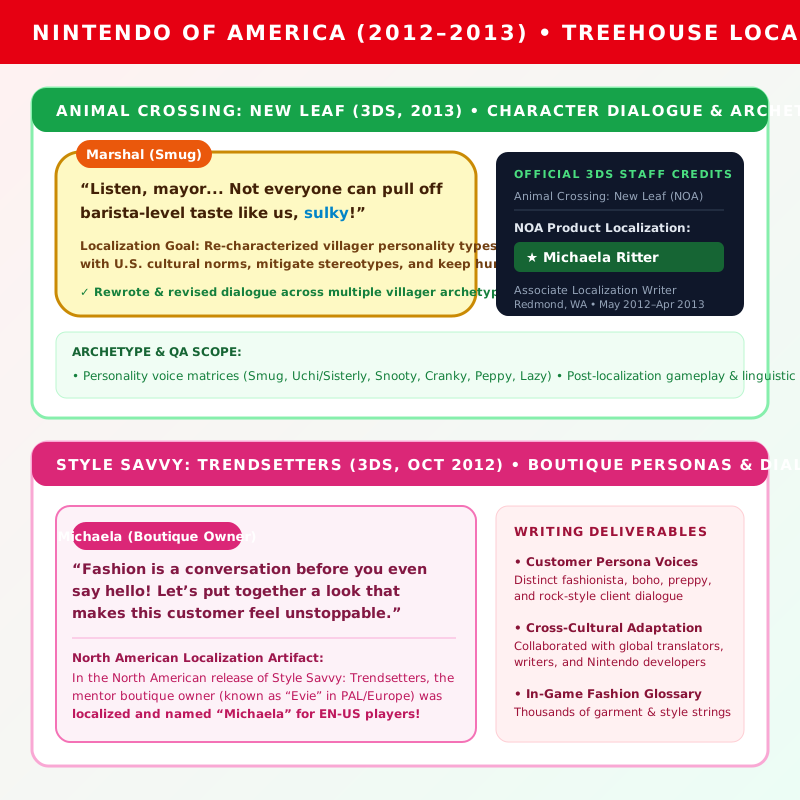
Nintendo • 2012–2013 Nintendo 3DS Localization: Animal Crossing: New Leaf and Style Savvy: Trendsetters

Game Localization + Character Voice: Animal Crossing: New Leaf & Style Savvy

Role In-house as Associate Localization Writer at Nintendo of America (Redmond, WA • May 2012 – Apr 2013)

The work Creative localization writer for Animal Crossing: New Leaf and Style Savvy: Trendsetters (Nintendo 3DS); re-characterized animal personality types to align with U.S. cultural expectations

Impact Wrote and revised beloved English dialogue for two smash-hit 3DS releases—officially credited in New Leaf, with Style Savvy’s North American boutique mentor even localized as “Michaela”!

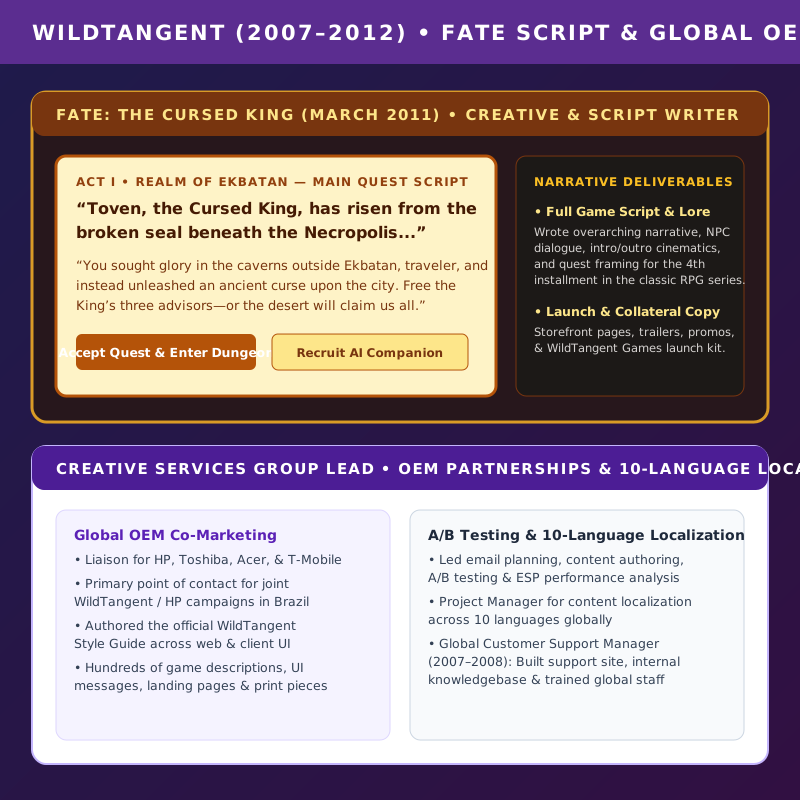
WildTangent • 2007–2012 WildTangent Games and FATE: The Cursed King script and localization

Game Script + Global Localization: FATE: The Cursed King & OEM Partnerships

Role In-house as Senior Marketing & Web Writer / Creative Services Group Lead at WildTangent (2007 – 2012)

The work Creative/script writer for FATE: The Cursed King; Creative Services lead for HP, Toshiba, Acer & T-Mobile partnerships (including WT/HP Brazil); A/B email testing; 10-language localization PM

Impact Authored the WildTangent Style Guide, scaled localized game storefront & support content across 10 languages, and penned the script for a classic action-RPG.

Why I Write • My Moma Mission Statement

I Make Words Count.

For 13 years, I’ve built content systems for products used by billions, treating conversation as the fundamental thread that connects us all.

From leading the redesign of flagship products like Gmail to localizing beloved Nintendo titles, I specialize in creating useful, honest, and human experiences. At Google, that meant being able to talk to anyone, anywhere, in a way that benefited us all.
Conversation is a fundamental part of being human
The Connecting Thread: Conversation Designing content for diverse user experiences, marketing, and game dialogue.

Featured Projects

Flagship product redesigns, enterprise content systems, and conversion-tested UX writing

← Back to Portfolio

Systems Thinking: The Currents UX/UI Writing Guide

Proving you don’t just write strings—you build the “connective tissue” that helps teams scale. (michaelar@ • Updated May 12, 2019 • go/currents-writing)

Why a Style Guide? In This Case, Consistency.

The guidelines for Google+ / Connect / Currents needed to be comprehensive, but also flexible enough to support a product strategy that changed every few months. One challenge was ensuring existing language supported, or at least didn’t contradict, changes in direction—such as adding a “hybrid” content mode and then shutting down consumer Google+.

Consistent patterns of information help users spend less time figuring out what to do, and ensure Currents looks, sounds, and behaves cohesively alongside Docs, Drive, Sheets, Gmail, Chat, Meet, and Calendar.

Currents UX/UI Writing Guide Key Constructs page
Original Artifact: Key Constructs (Streams & Tags) Click image to zoom. Full 22-page PDF available for download.

How We Talk to Users: “Voice = Climate. Tone = Weather.”

Voice is what a particular writer sounds like. Google has a lot of writers, but we all strive to write using the same voice. Tone is the attitude behind those words, which can change depending on the situation—is it serious (dealing with money or account deletion), or playful (a Photos surprise)?

Layer Pillar 1 Pillar 2 Pillar 3
GOOGLE Useful: Put the most important info first, and don’t burden users with the details. Honest: Be clear and direct with bad news or complicated concepts. Human: Use plain language. Contractions, short words, nothing fancy.
G SUITE Authentic: Don’t use jargon or technical terms. Give each interaction a touch of humanity that reminds users there are people behind G Suite. Empowering: Our users are the star of the show. We build tools to help them do what they do best. Ultimately, they’re in the driver’s seat. Enthusiastic: In a sea of enterprise software, G Suite differentiates by being comfortable enough in our own skin to admit we’re excited about the future of work.
CURRENTS Connective: Brings together people and knowledge. Think connective tissue—sparking ideas across an entire organization, rather than just a team. Thoughtful: Supports longer-form posts and slows things down. Think conversation—bringing attention to discussions that aren’t task-based like email or chat. Harmonious: Everyone has a voice here. Avoid creating division with terms like “senior leadership” or discouraging language. Currents is “we’re all in this together.”

Key Actions & Preposition Architecture

To prevent vocabulary collisions with Google Docs and Drive (where “Share” means file collaboration), I established clear rules for every core user action in Currents:

Term (Use / Not) When to Use Usage & Preposition Rules
Use Post, posting, posted
Use Comment, commented

Not Share, sharing (reserved for Docs/Drive collaboration)
Original text and images authored by a single user. • Posted in [community name] (a community is a subset/within)
• Posted to Google+ / Currents (the whole)
• Pro tip: Avoid prepositions altogether by visually treating quotes differently: Carla posted That was a long way…
Use Create, created
Not Share a poll, add a poll
Polls, new communities, and collections (say “posted a poll” when referring to publishing). • [Name] created a poll [poll name]
• Note that a poll always includes the content type—a poll—unlike other post types.
Use Like, liked / Remove like
Not +1 or Dislike
Referring to the thumbs-up icon (which replaced the Google+ +1). • Reversing your like action is remove like, never dislike (there is no dislike option).
Use stream, streams
Not Admin stream, custom stream, feed
The visual flow of content cards and saved-search topic feeds. • DO Refer to the home stream as just Home in the UI; say create a stream.
• DON’T Capitalize streams or say add a stream.
Use Suggested because you follow #cats
Not “Posts you might like” or “Suggested posts”
Inline content recommendations. • “Posts you might like” is too vague and risks losing user trust if wrong. Always spell out the signal: “You follow #cats”.

Greenlines & Accessibility (9M+ Users)

What are greenlines? Greenlines are annotated mocks for elements on a page that help screen readers process a layout as if someone were looking at it.

Greenlines help 9+ million visually impaired users better navigate our products. Every new feature in Google+ and Currents required associated greenlines and localization-conscious strings (short, free of idioms/colloquialisms, and free of UI spatial references like “left” or “above”).

Android vs. iOS Platform Conventions

Rule Android (Material) iOS (Apple HIG)
Capitalization Sentence case Title Case
Periods Omit after single sentence or last sentence Always use
Referring to apps Don’t enclose in quotes Enclose in quotes

Meet the Writer (~ Me ~)

This Is How I Look Most of the Time

Hi, I’m Mika Ritter—a Senior UX Writer and Content Designer with 13+ years of experience building content systems for large-scale products, from flagship Google Workspace apps used by 1.5 billion people to Nintendo 3DS classics and Allrecipes.

Before tech and gaming, I earned my B.S. in Entomology from Texas A&M University—which turned out to be surprisingly great training for taxonomy, systems thinking, and filing very detailed bugs in Buganizer.

Following my tenure at Google (2016–2022), I took a planned sabbatical from 2022 to 2025 to support aging family, travel, pursue creative interests, collaborate with UX writing peers on emerging AI-assisted design workflows, and even take on a crew position at Trader Joe’s in 2025.
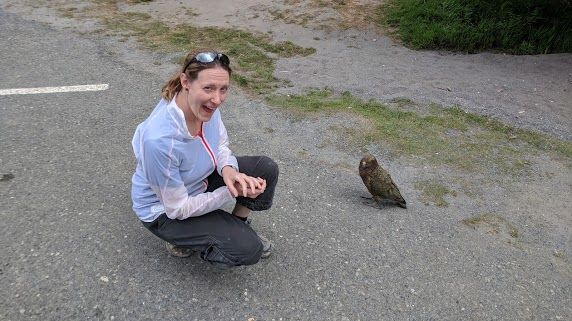
Mika Ritter crouching next to a wild Kea parrot in New Zealand
Field Research in New Zealand “I’d wanted to see a Kea for years. This Kea did not disappoint.”

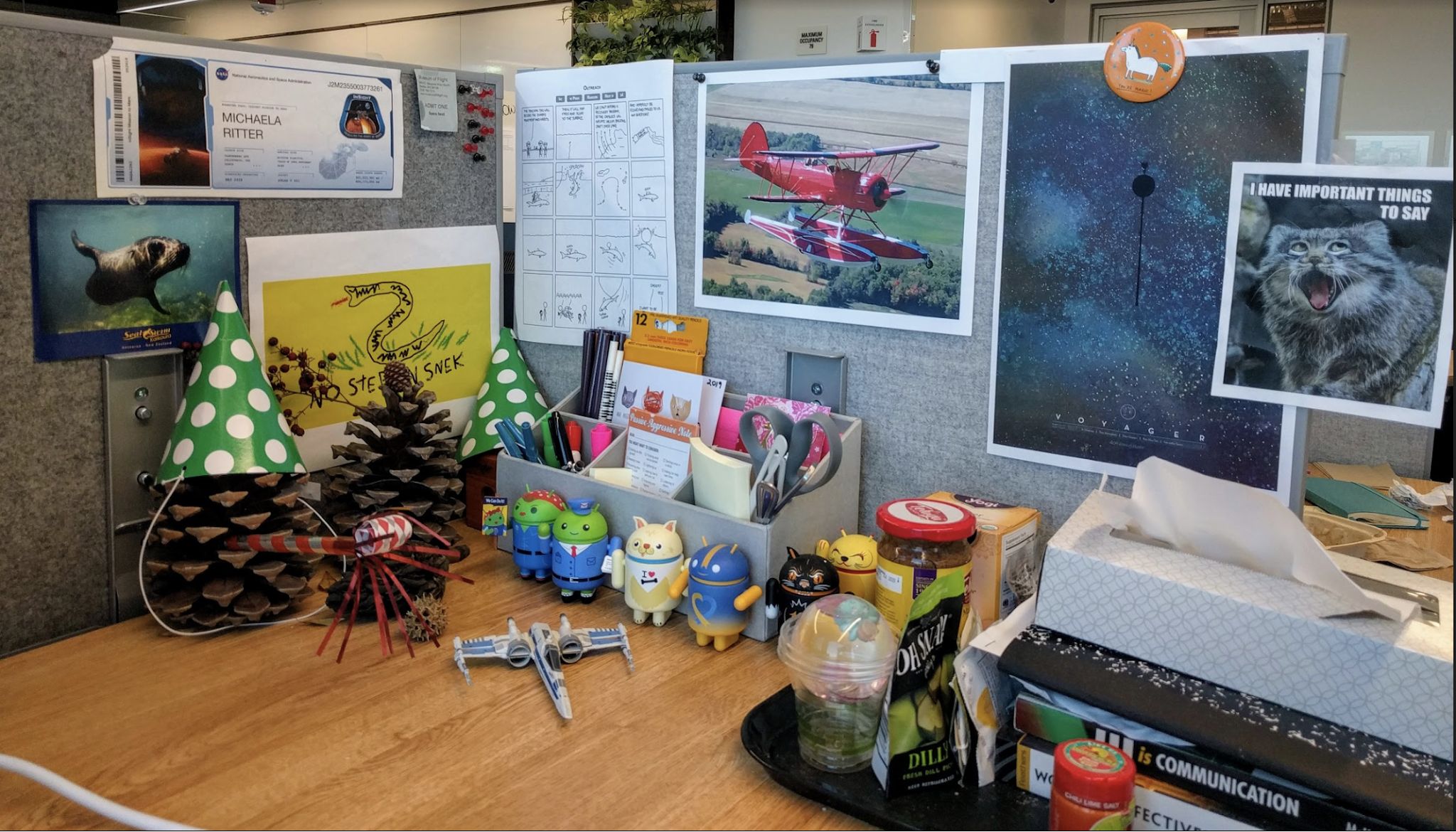
Mika Ritter's desk at Google with Android figurines, airplane poster, and cat sign
End Credits: My Desk at Google Complete with Android collectibles, a floatplane poster, pine-cone trees, and an “I HAVE IMPORTANT THINGS TO SAY” cat print.

End Credits: Things I Do a Lot

You can learn a lot about a person by looking at their desk. Outside of UX writing, I do these things a lot:

  • Watch pretty good TV
  • Play a game with dinosaurs in it
  • Ride my bike fast slow, these days
  • Drink malty beers and eat chips
  • Aspire to be a private pilot, because flying
  • Agonize over word choice
“The absurdity of nature and general whimsy sustain me. Combine the two and you get snakes in hats.” Content warning: hats

My Rudemates

Meet Benjamin and Hobbes—co-coworkers, nap specialists, and tireless supervisors of every style guide draft.
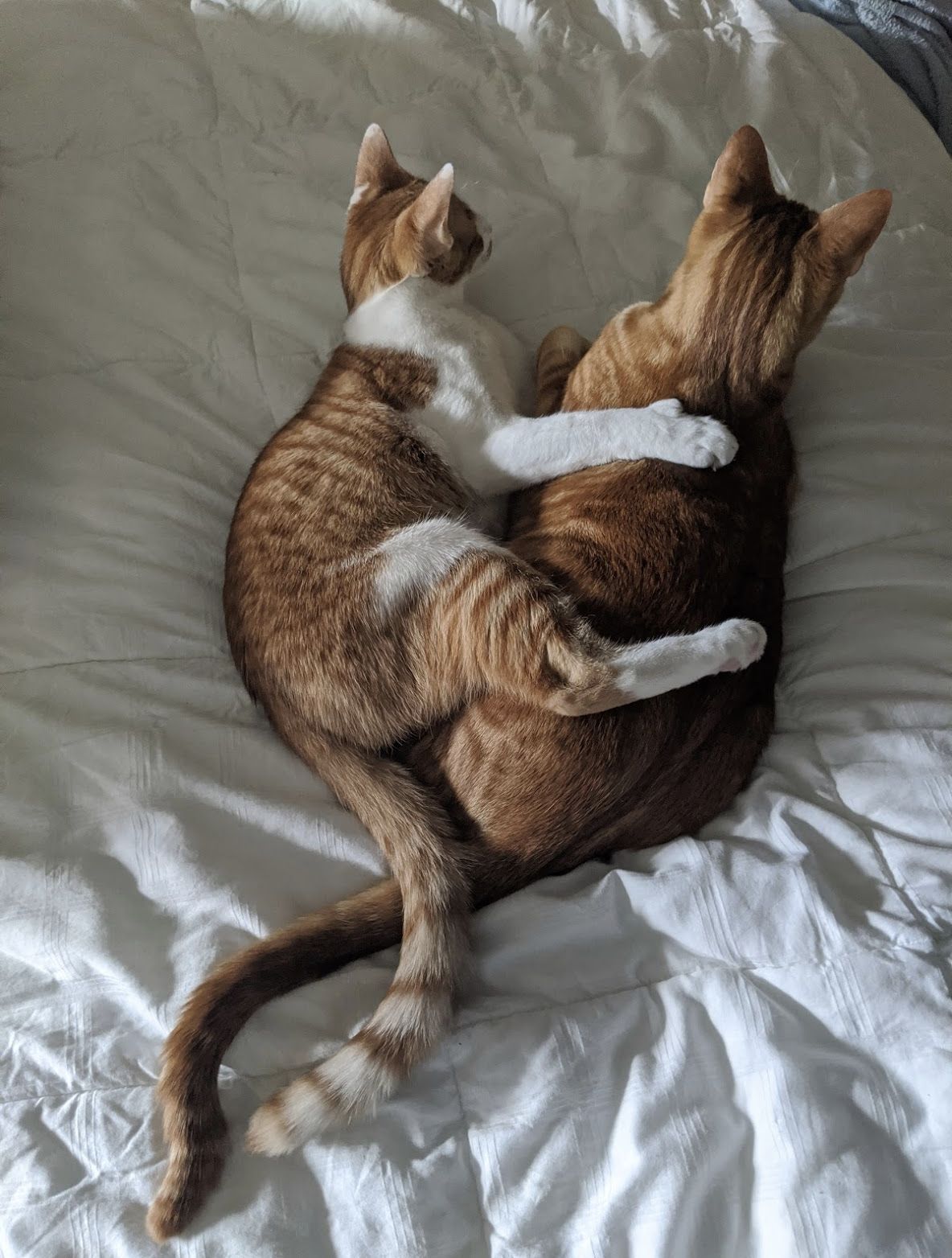
Benjamin and Hobbes cuddling
Benjamin & Hobbes “Benjamin and Hobbes spreading viruses, probably”

Resume — Mika Ritter

⬇ Download Resume PDF ⬇ Portfolio Deck PDF ⬇ Chat History & Samples PDF

Summary

Senior UX Writer with 13+ years’ experience building content systems for large-scale products, including work in AI-assisted design workflows, usability testing, and cross-functional delivery.

Sabbatical / Elder Care

2022 – 2025

  • Took a planned sabbatical following my Google tenure to support aging family, travel, and pursue creative interests.
  • Stayed current with UX writing practices through peer collaboration and exploration of emerging AI-assisted design tools.
  • Also took a crew position at Trader Joe’s in 2025.

Google | UX Writer — Gmail and Chat

Sunnyvale, CA | Jul 2019 – Sep 2022

  • UXW for flagship products used by 1.5 billion people during a major redesign across Hub’s 7 pillars, working alongside 17+ designers and 10 researchers.
  • Drove content strategy for the “next generation of Gmail” (Hub) from inception to launch.
  • Ensured cross-functional alignment with UXD, PM, engineers, marketing, privacy, and legal.
  • Crafted comprehensive explorations of naming and verb-oriented navigation labels, using them to build consensus and create guidelines.
  • Partnered with UXR on usability testing, surveys, and voice and tone explorations.
  • Worked with marketing on video scripts for Cloud Next 2020.

Google | UX Writer — Currents and Google+

Sunnyvale, CA | Aug 2016 – Jul 2019

  • UXW for Spaces (2016 app), Google+, and Currents.
  • Wrote style guides, notifications, onboarding, tooltips, search result framing, end-of-stream and empty state messages, etc.
  • Partnered with UXR and Marketing on product vision, value prop, and messaging (Currents).
  • Led content strategy for shutdown banners, announcements, and other relevant touchpoints (Google+ and Spaces).
  • Owned shutdown communications for 3rd party, consumer, enterprise, and internal workstreams (Google+).
  • Led content testing on tag-related language and stream naming.

Allrecipes | Senior UX/UI Writer

Seattle, WA | Sep 2013 – Apr 2016

  • UXW for Allrecipes’ redesigned site and Dinner Spinner iOS and Android apps (including registration flow improvements yielding a 25% lift in sign-up starts).
  • Additional writing for email (e.g., 4.17M-recipient Breakfast Campaign with 27.47% open rate & 17.77% CTR), social campaigns, branded cookware, Cooking School, video spots, and in-app purchases.
  • Produced a comprehensive Allrecipes UI writing style guide.
  • Partnered with UX Designers and Researchers on prototyping and usability study scripts.

Nintendo of America | Associate Localization Writer

Redmond, WA | May 2012 – Apr 2013

  • Creative writer for the EN-US release of Animal Crossing: New Leaf and Style Savvy: Trendsetters.
  • Localized game dialog and scenarios for several character archetypes and key personas, re-characterizing animal personality types to better align with U.S. cultural norms and mitigate stereotypes.
  • Performed post-localization gameplay and informal QA in collaboration with global writers, translators, and developers.

WildTangent | Senior Marketing and Web Writer

Redmond, WA | May 2008 – May 2012

  • Promoted to team lead for creative services.
  • Served as the liaison for creative partnerships with HP, Toshiba, Acer, T-Mobile, et al., including joint WT/HP campaigns in Brazil.
  • Planned, wrote, and A/B tested email campaigns with high-level performance analysis.
  • Managed content localization process across 10 languages.
  • Wrote email newsletters, promos, landing pages, triggered UI messages, paid search ads, game descriptions, print pieces, and the WT style guide.
  • Wrote the script for FATE: The Cursed King and collateral material.

WildTangent | Global Customer Support Manager

Redmond, WA | Jul 2007 – Mar 2008

  • Primary writer for customer support site and internal knowledgebase.
  • Project manager for WildTangent customer support localization and global staff training.
← Back to Portfolio

Hub: The Next Generation of Gmail

Owning UX writing across Hub’s 7 pillars—unifying Gmail, Chat, Spaces, Search/Assistant, 3P apps, Meet, and Currents for 1.5 billion users.

Company & TimelineGoogle (Jul 2019 – Sep 2022)
Cross-Functional Scope7 Pillars • 17+ Designers & 10 Researchers
Horizontal Teams“Lattice” (VisD, UXR, UXE) & Smart Canvas
Reach1.5 Billion Active Users

1. The Challenge: All Your Conversations in One Place Across 7 Pillars

I owned UX writing for “Hub,” a core part of developing Google Workspace that combined Gmail, Chat (direct messages + spaces with embedded tasks/editors tools), G Suite Search and Assistant, 3rd-party integrated apps, Meet (with jimgroves@), and Currents. I also supported the “Lattice” horizontal team, comprised of Visual Design (VisD), UX Research (UXR), and UX Engineering (UXE).

My coverage extended across Hub’s 7 pillars, working alongside 17+ designers and 10 researchers at any given time, in addition to PM, Eng, Marketing, Privacy, and Legal requests.
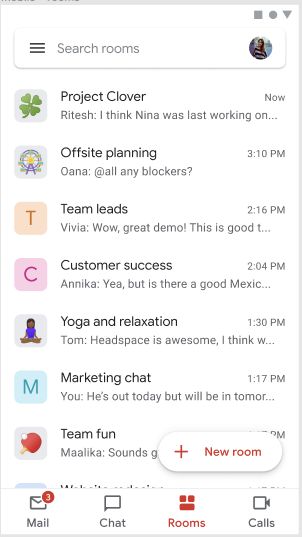
Gmail Hub mobile Rooms tab showing Mail, Chat, Rooms, Calls navigation
Mobile Unified Navigation Integrating Mail, Chat, Rooms, and Calls into a single mobile bar without overwhelming the inbox.
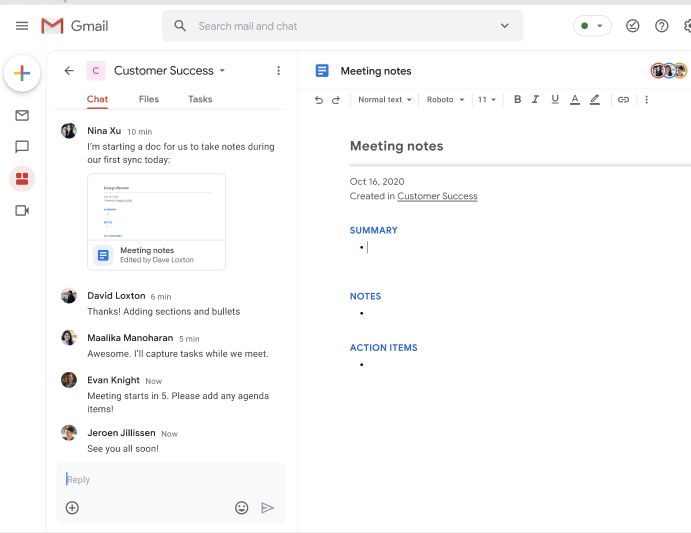
Gmail Hub desktop workspace showing Chat and live Google Docs Meeting notes side-by-side
Desktop Integrated Workspace (Cloud Next ’20) Side-by-side Room chat and live Google Docs (“Meeting notes”) inside Gmail, eliminating tab-switching.

2. Updated Onboarding: UXW Tactics + A Little Marketing Sizzle

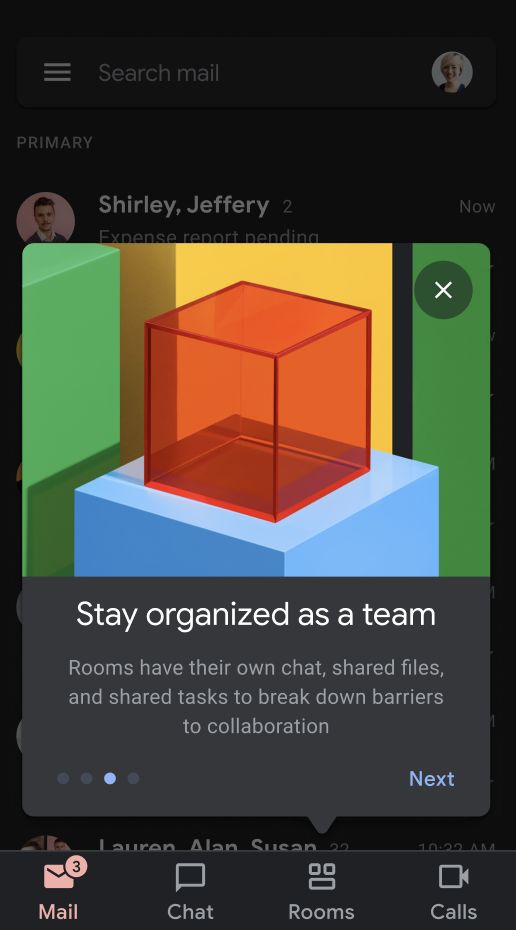
I wrote the splash screen onboarding text for Gmail (Hub)—UX writing and marketing swirled together—introducing the new with the old so users knew their inbox was safe while discovering faster ways to talk and collaborate. It tested exceptionally well in biweekly usability studies.
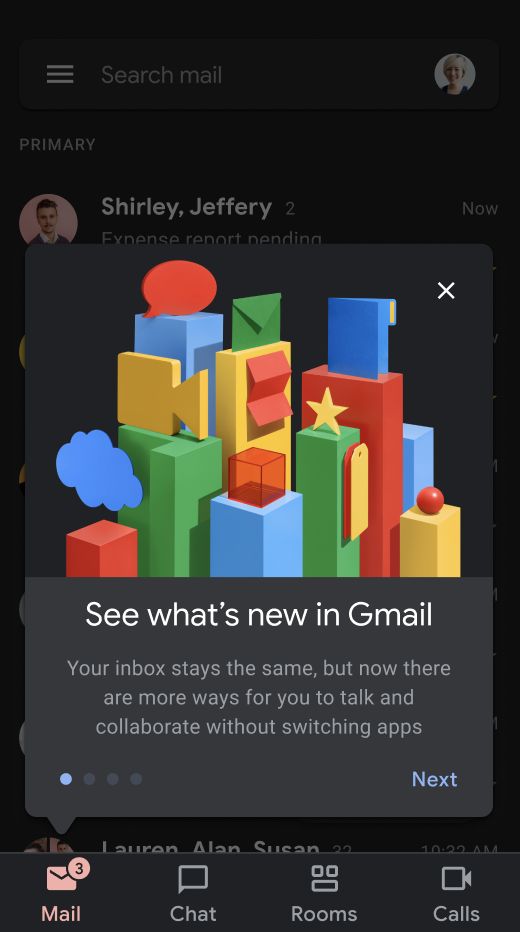
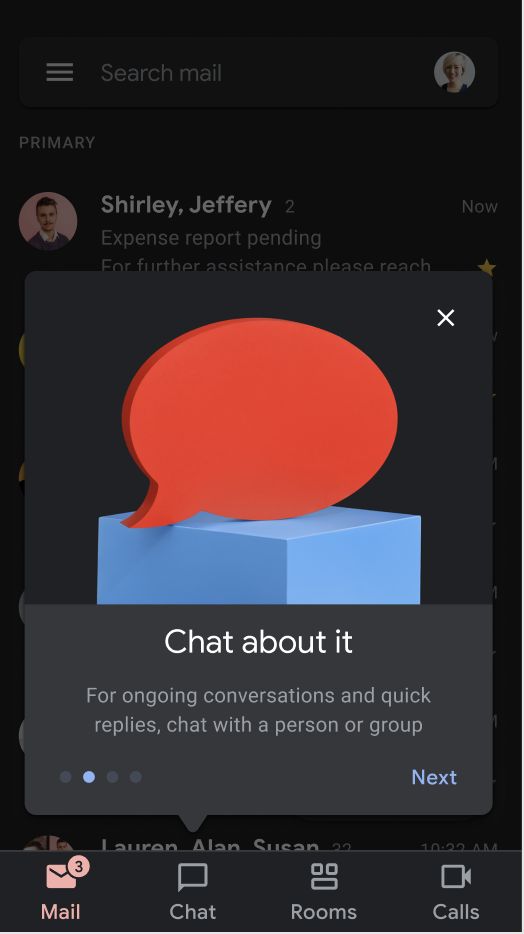
Onboarding Step 1: See what's new in Gmail
Screen 1: Reassure & Frame “See what’s new in Gmail — Your inbox stays the same, but now there are more ways for you to talk and collaborate without switching apps”
Onboarding Step 2: Chat about it
Screen 2: Direct & Group Chat “Chat about it — For ongoing conversations and quick replies, chat with a person or group”
Onboarding Step 3: Stay organized as a team
Screen 3: Collaborative Rooms “Stay organized as a team — Rooms have their own chat, shared files, and shared tasks to break down barriers to collaboration”

3. Navigation & Naming: Less Like a Storage Box, More a Place to Work Together

I advocated for verb-oriented navigation labels to give Gmail a more dynamic feel—less like a storage box and more a place to work together.

However, naming the collaborative “spaces” was tricky:
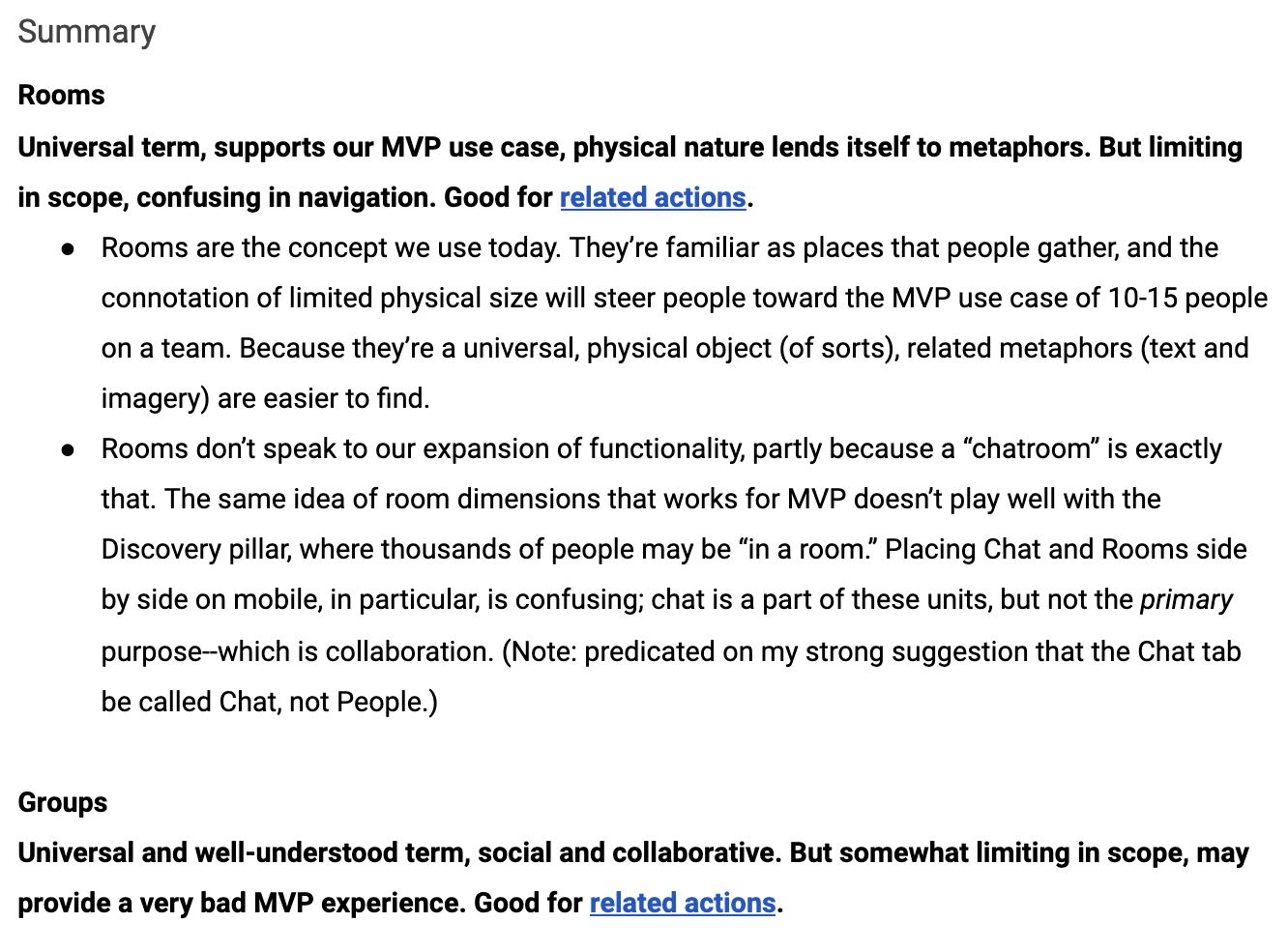
  • Rooms, groups, or spaces (Collaboration tab): Evaluated physical metaphors, MVP scope (10–15 teammates), and long-term Discovery scale (thousands of people). Advocated strongly that the 1:1 messaging tab be called Chat (not People) so it wouldn’t collide with collaborative spaces.
  • Mail or Inbox: Evaluated cohesion across mobile and web mental models.
  • Call or Calls (Meet): Conducted two rounds of naming and usability validation.
“Placing Chat and Rooms side by side on mobile, in particular, is confusing; chat is a part of these units, but not the primary purpose—which is collaboration.”
Navigation and naming analysis document comparing Rooms and Groups
Original Naming Exploration Artifact Evaluating “Rooms” vs. “Groups” for the Collaboration tab (click to zoom).

4. Gmail Mail Merge, Email Personalization & Smart Canvas (Feb 2022)

Beyond Hub navigation and Chat integration, I also partnered on Gmail Mail Merge / Email Personalization (`go/gmail-mail-merge-PRD`) and Layouts v2 (`Fancymail V2 UX | go/layouts-v2`)—shaping multi-send placeholders, server-side replacement flows, and Mail Merge as a first iteration of Smart Canvas in Gmail.
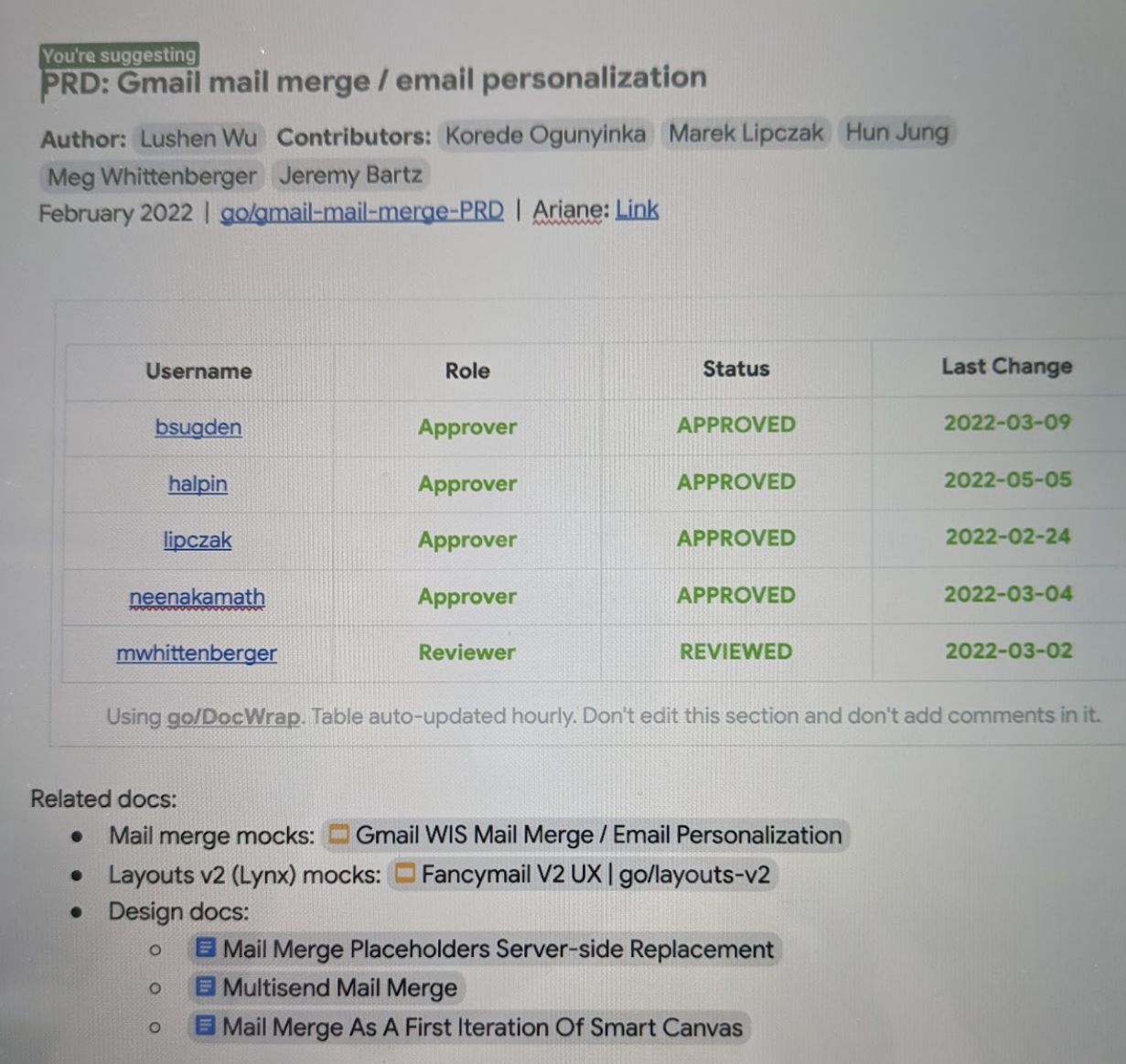
PRD: Gmail mail merge / email personalization (Feb 2022)
Gmail Mail Merge & Smart Canvas PRD (Feb 2022) Multi-send mail merge, placeholder replacement, and Fancymail V2 layouts.
← Back to Portfolio

Systems Thinking: Currents UX/UI Writing Guide

Building the “connective tissue” that helps teams scale—a 22-page content design system and “Voice = Climate, Tone = Weather” framework.

Company & TimelineGoogle (Aug 2016 – Jul 2019)
RoleLead UX Writer (Currents & Google+)
Deliverable22-Page Style Guide (go/currents-writing)
ImpactSelf-Service UXW Across G Suite

Designing Language for a Moving Target

The guidelines for Google+ / Connect / Currents needed to be comprehensive, yet flexible enough to support changing product strategies—including the addition of a “hybrid” content mode, the sunset of consumer Google+, and the absence of brand or marketing direction until January 2019.

I created go/currents-writing so product managers, engineers, and designers could self-serve routine pattern questions (Remove or Delete? They or He/She? Post or Share?) while knowing exactly when to loop in a UX Writer (multi-step flows, persuasive text, or emotionally charged scenarios like moderator post removal).

Currents UX/UI Writing Guide Key Constructs
Key Constructs: Streams & Tags Clear DO and DON’T guardrails accompanied by real UI component captures.
← Back to Portfolio

Currents: Positioning, Onboarding, Active Tags & Empty States

Defining product vision before branding existed, winning 80% participant preference on progressive onboarding, and systematizing tags & empty states.

Company & TimelineGoogle (2018 – 2019)
PartnersUX Research (giuliamazza@) & UX Design (ohu@)
MethodsVision Deck, Hallway Testing, Spark Naming Workshop
Usability Result80% (4 of 5) Preferred Progressive Onboarding

1. Product Positioning: A Vision for Currents

Currents didn’t have dedicated branding or marketing help until January 2019—but our team needed a point of view before then.

When UX Researcher giuliamazza@ approached me with the idea to create a vision deck, I happily teamed up with her. Together, we mapped the core mission (“Why work matters”) across three pillars—Productivity (Currency: Information), Mission (Currency: Purpose & Alignment), and Socializing (Currency: Recognition). Later, our work was drawn upon directly to create official marketing assets.
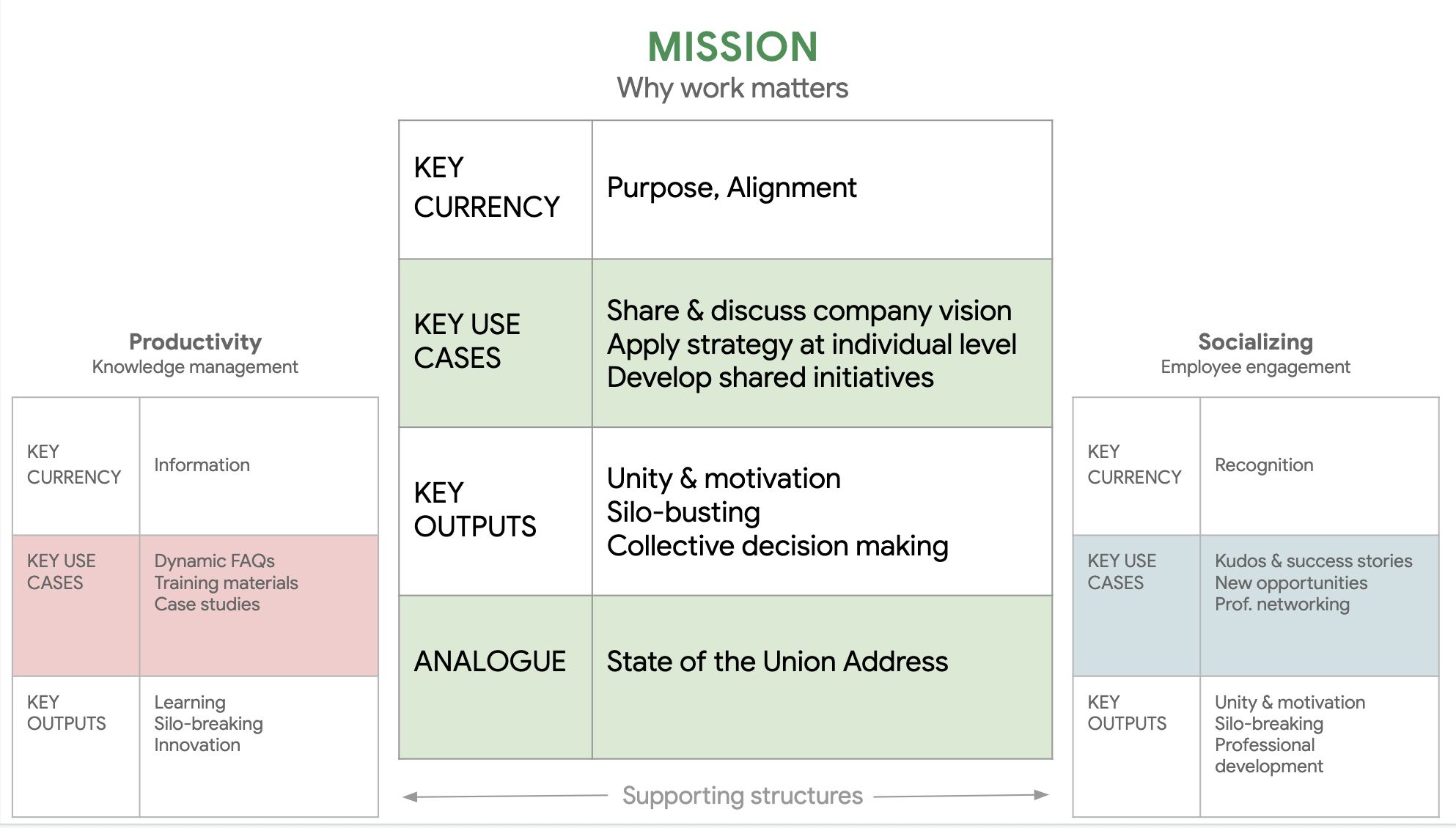
Currents Product Positioning Vision Matrix
Original Vision Deck Matrix Co-created with UXR before formal branding existed; later adopted into official marketing assets.

2. Better Onboarding: Preferred by 80% of Test Participants

Version B Proposed Modal with Tooltips in Product
Version B: Contextual Modal + Tooltips Preferred by 80% (4 out of 5) of usability test participants over the legacy 3-screen flow.

Currents onboarding originally consisted of a welcome email and a 3-screen warm welcome. Users didn’t know what to expect from the product, yet were asked to choose people and tags to follow before they could even try it out.

UXD ohu@ and I proposed a new onboarding experience with a revised welcome email, a splash screen with a single-sentence value proposition, and contextual in-product tooltips. Our contextual and progressive onboarding was preferred by 80% of test participants.

3. Active Tags Exploration: Trending vs. Popular Tags (2019)

In 2019, I led content testing and UX explorations on tag-related language (Active Tags exploration):

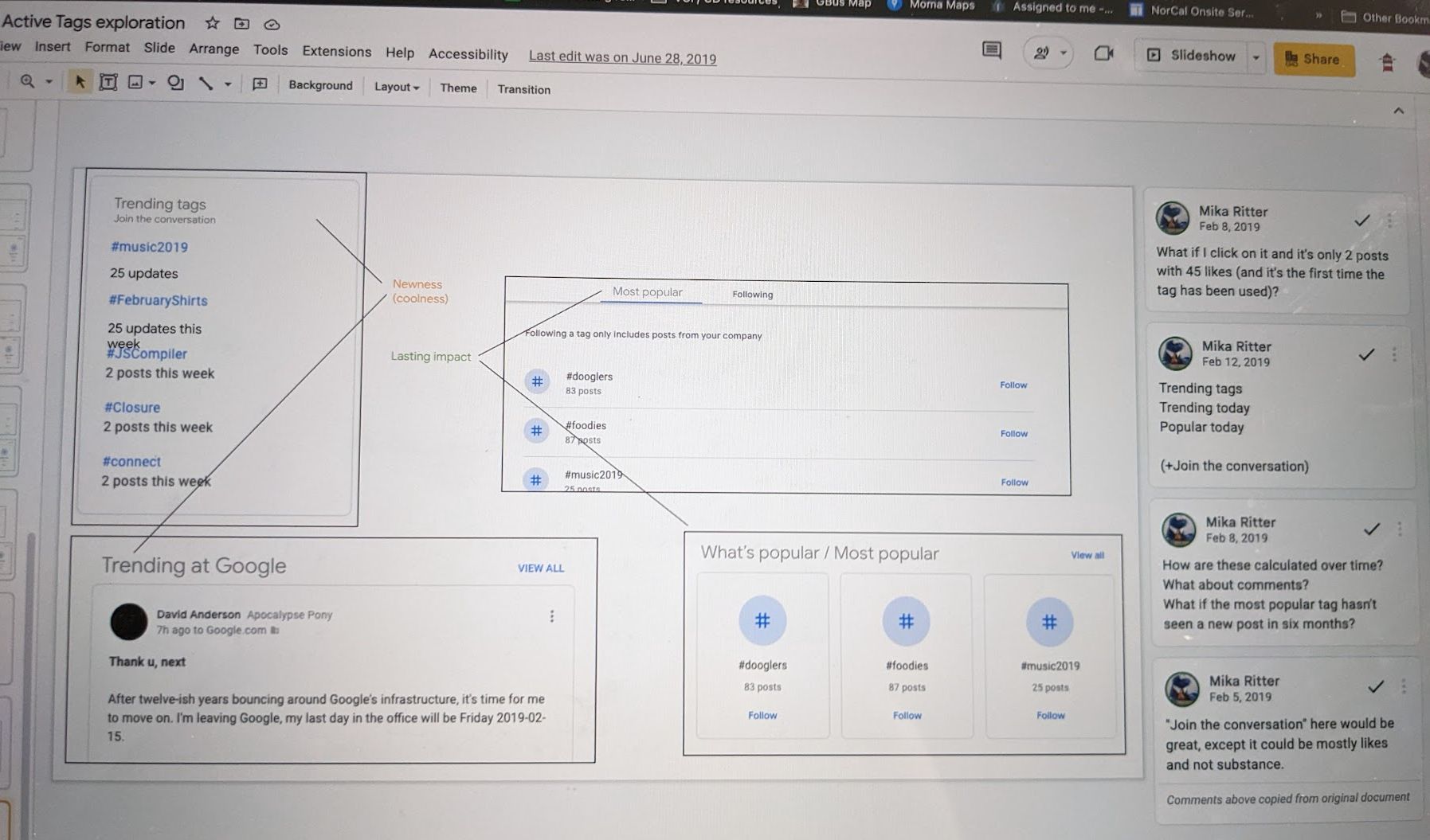
  • Newness (“coolness”) vs. Lasting Impact: Differentiated short-term velocity (Trending tags / Trending today / 25 updates this week) from long-term organizational volume (Most popular: #dooglers, #foodies, #music2019).
  • Substance Over Vanity Metrics: Challenged default promotional microcopy like “Join the conversation” when a trending tag only had likes rather than substantive discussion, and questioned how staleness is handled if a “Most popular” tag hasn’t seen a new post in 6 months.
Active Tags exploration wireframe and Mika Ritter comment thread
Active Tags Exploration (Feb–June 2019) Evaluating “Newness (coolness)” vs. “Lasting impact” and tag calculation transparency (click to zoom).

4. Interactive Carousel: End-of-Stream & Empty States (Browsing vs. Seeking)

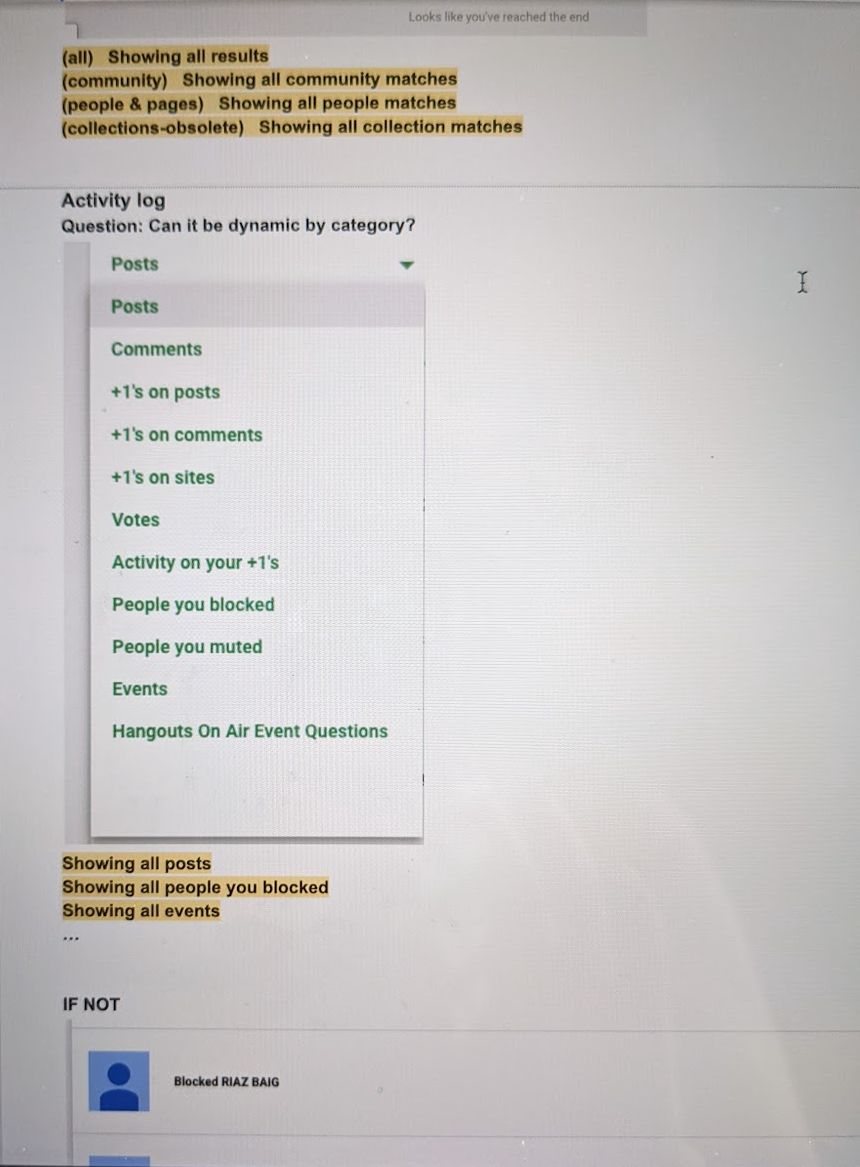
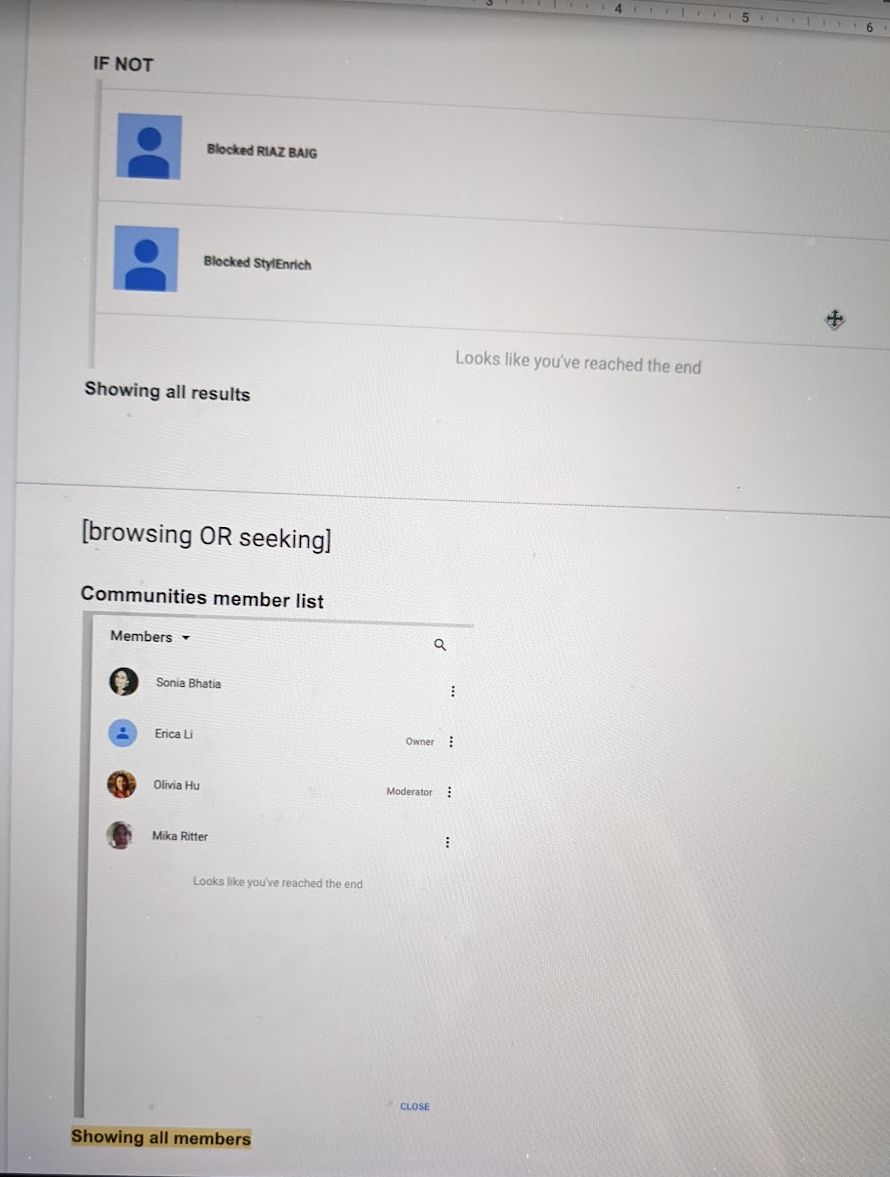
In go/currents-endstream-messages (updated Dec 21, 2018), I audited every feed, notification panel, search tab, activity log, and member list in Currents, establishing a clear behavioral rule:
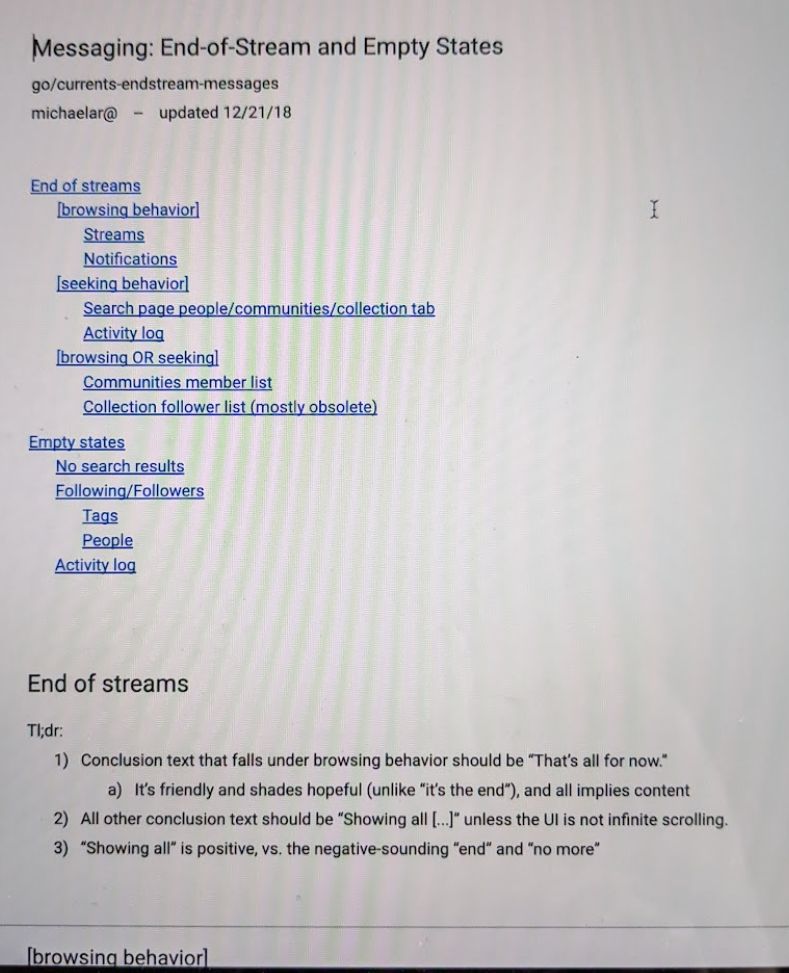
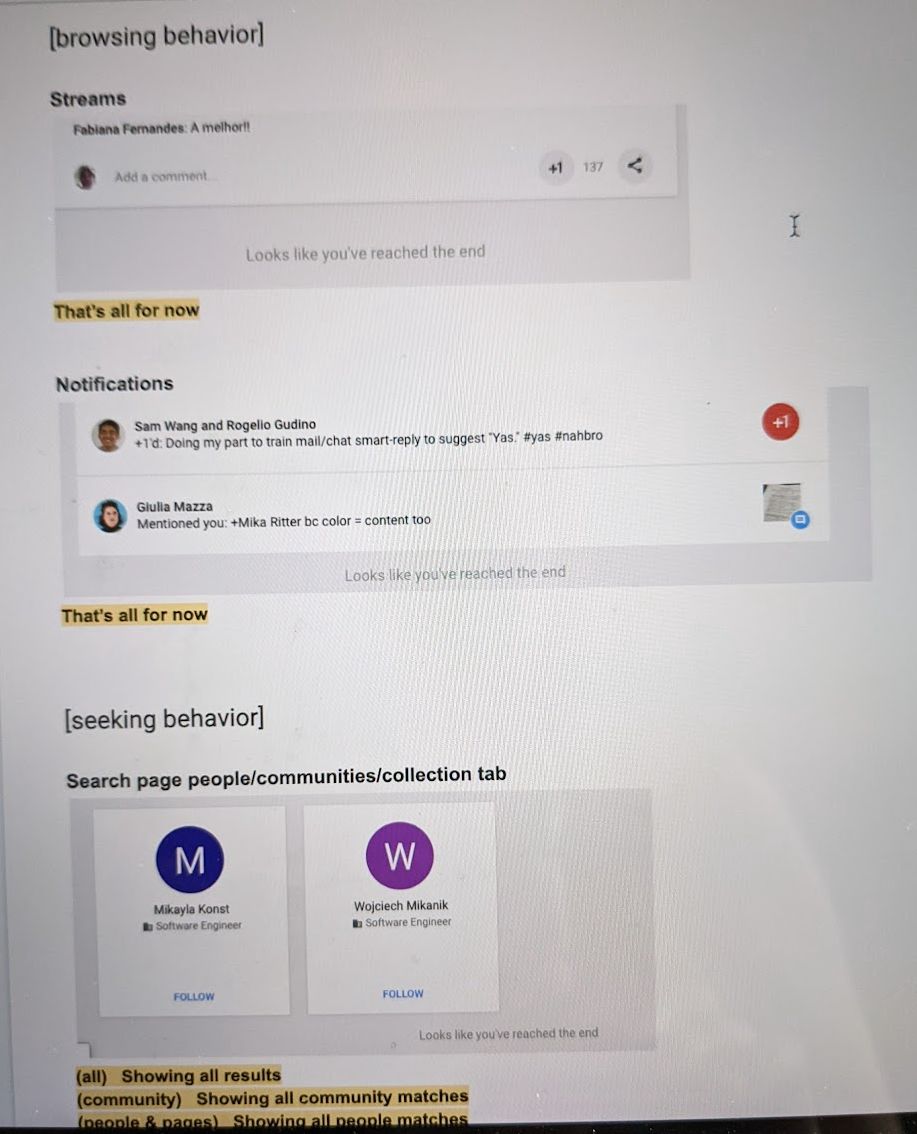
  • Browsing behavior (Streams, Notifications): Use “That’s all for now”—it’s friendly and shades hopeful (unlike negative-sounding “Looks like you’ve reached the end” or “It’s the end”).
  • Seeking behavior (Search results, Activity log, Member lists): Use “Showing all [results / community matches / people matches / members]”—because “Showing all” is positive and confirming, whereas “no more” or “end” sounds like an error.

5. Naming Workshop: “Streams” vs. “Feeds”

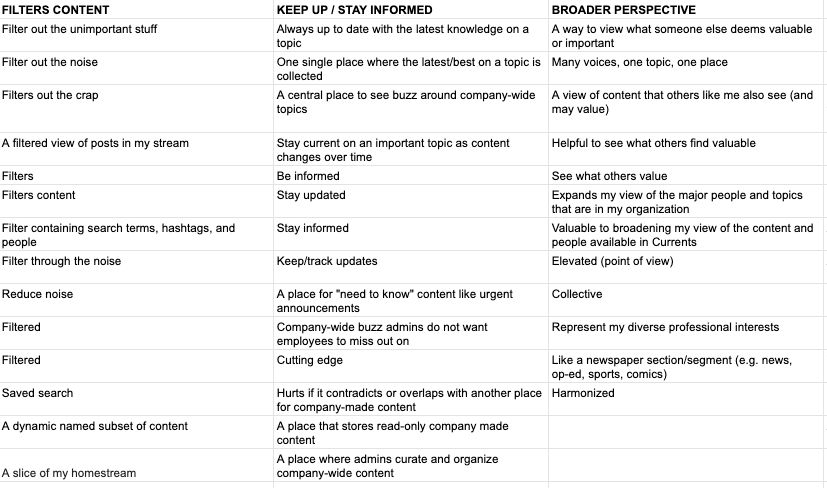
Early in Currents’ development, I conducted quick hallway testing of the name streams, and later ran a cross-functional naming workshop (based on Spark) with UXD, UXR, and PM, clustering raw participant data across value pillars (Stay Informed / Filters Content, Focused / Organized, and Broader Perspective / Company-wide). Spoiler: We stuck with streams.
Naming workshop clustering spreadsheet
Spark Naming Workshop Clustering Data Mapping user mental models across Filtering, Staying Informed, and Broader Perspective.
← Back to Portfolio

Google Chat: Threading + History Addendums, Presence & Marketplace

Turning “supremely confusing” 4-state thread & reply retention rules into crystal-clear microcopy—plus classic Hangouts migration and 3P Marketplace apps.

Company & TimelineGoogle (2018 – Feb 2022)
Featured Deck(Dasher) Chat History Addendums (Feb 2022)
Sign-Off PartnersPM (Angela Ying), UXD (Travis Gohr), Legal, Eng

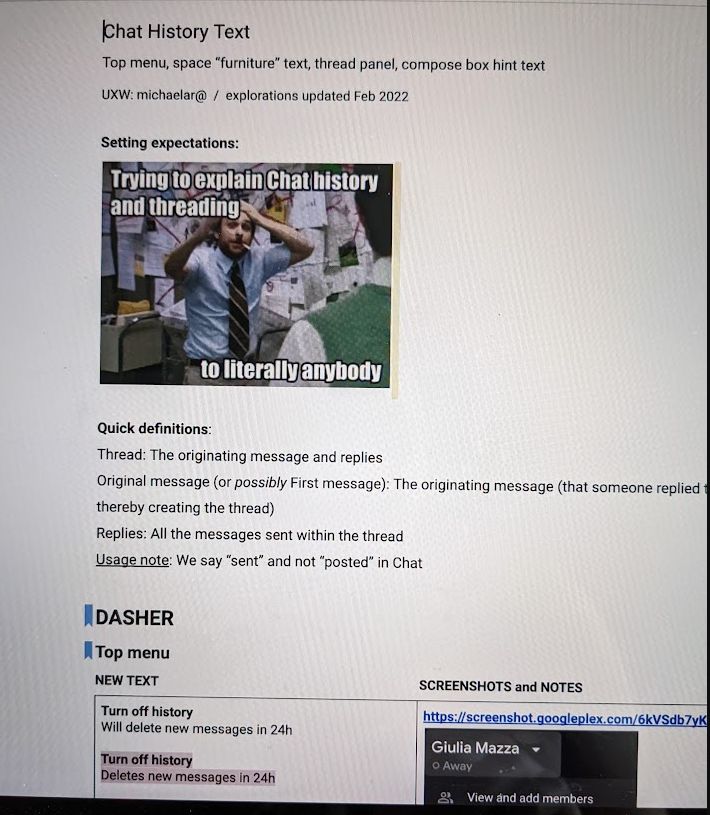
1. The “Charlie Day” Problem: Explaining Chat History + Threading to Literally Anybody

When Google Chat introduced inline Threading inside spaces where History could be toggled On or Off mid-conversation (or governed by enterprise domain retention policies), users faced four intersecting states:

  1. Original message: History Off + Current State: History Off
  2. Original message: History Off + Current State: History On (the whole thread still self-destructs 24 hours after the first message!)
  3. Original message: History On + Current State: History Off (the first message is saved per org policy, but new replies are deleted in 24 hours!)
  4. Original message: History On + Current State: History On

In February 2022, I authored the (Dasher) Chat history addendums deck and spec document—iterating through UI mocks, menu toggles, and edge cases with PM (Angela Ying), UXD (Travis Gohr), Legal (Genaro Lopez, Paul Herzlich), and Eng (Greg Leaver) to reach final sign-off.
2. Presence, Classic Hangouts Migration & G Suite Marketplace

Alongside Threading + History, I owned UX writing for:

  • Presence Indication: Do not disturb, mute notifications, activity status, and custom status text.
  • 3rd-Party App Submission to the G Suite Marketplace: End-to-end user discovery, installation, permissions, and uninstallation flows.
  • Migrating Users from Classic Hangouts to Hangouts Chat: Admin console changes, classic client deprecation banners, and the Dynamite PWA launch.
← Back to Portfolio

Product Lifecycle: Shutting Down Google+ & Spaces

How do you tell 4 billion people that Google+ is going away, when many don’t even know what Google+ is? You do it with grace and sensitivity.

Company & TimelineGoogle (2016 – April 2019)
RoleLead Shutdown Comms UX Writer
WorkstreamsConsumer, Enterprise, Developer, Internal
StakeholdersLegal, Privacy, PR, SVP/VP Leadership

Owning Product Comms Across 4 Workstreams for 4 Billion Accounts

Because Google+ had been integrated with most Google products for 8 years, millions of people had a consumer Google+ profile without realizing it—and worried that “Google+ shutting down” meant losing their Gmail, Google Photos, or YouTube accounts.

I owned product communications for the shutdown of consumer Google+ (completed April 2, 2019) as well as the earlier 2016–2017 sunset of the Google Spaces app. This included months of emails, in-product banners, posts, and Help Center FAQs reviewed by dozens of stakeholders up to the SVP/VP level across four separate workstreams:
  • Consumer: Clear, reassuring emails and banners explaining how to download Google+ data via Takeout while emphasizing that Gmail, Photos, and Drive remained safe.
  • Enterprise: Reassuring G Suite admins and organizations that workplace accounts were continuing and transitioning to Google Currents.
  • Developer / 3rd Party: Deprecation notices for Google+ APIs and OAuth Sign-In integrations.
  • Internal: Coordinating messaging across partner Google teams.
Google+ Shutdown Banner, 4-Workstream Matrix, and Google Spaces Sunset
Consumer Google+ & Spaces Sunset Architecture Click image to inspect the 4-workstream breakdown and sunset banner copy.
Grace and sensitivity slide graphic
From Mika’s Slide Deck: *Grace and sensitivity
← Back to Portfolio

Some of My 20% Projects: Duplex, Doodles & Social Good

From Google’s automated calling service announced at I/O 2019 (Duplex) to guiding 20+ volunteer writers on Google Doodles (“The Scribble Team”).

Company & TimelineGoogle (2016 – 2020)
ProjectsDuplex (I/O ’19), Google Doodles, Kids Zone, Social Good
Editorial ScopeGuiding 20+ Volunteer Writers on The Scribble Team
20% Partnerkristenwong@ (Assistant & Kids Zone)

1. Duplex (Announced at Google I/O 2019) & Kids Zone

Duplex is Google’s automated calling service announced at I/O 2019. The initial scope for this 20% project was to provide UX writing support for reservation experiences made through the Google Assistant—for example, making a restaurant reservation or booking a haircut appointment. Midway through the quarter, 20% project lead kristenwong@ and I also expanded our support to ship UX writing requests for Kids Zone.

2. The Scribble Team (Google Doodles Blog)

“Scribbles” are the behind-the-scenes blog posts that launch alongside Google Doodles. As one of three editors, I guided 20+ volunteer writers—helping to keep them on topic, on brand, and still having fun (while killing their darlings with a light touch). Probably the most fun project I’ve worked on at Google.

3. Google Social Good (Donation History Portal)

Way back in 2016, I was the UX Writer for iterations of Google’s donation history portal. My job was to transform data pulled straight from the API into jargon-free writing, putting the most important info first and encouraging additional charitable giving.

Google Side Hustles Visual Artifact
Google 20% Projects & Side Hustles Artifact Click image to enlarge.
← Back to Portfolio

Allrecipes: +25% Sign-Up Lift, 2015 Redesign Overlays & Dinner Spinner

Driving a 25% lift in registration starts, onboarding millions of cooks to the redesigned social platform, and A/B testing email campaigns to 4.17M subscribers.

Company & TimelineAllrecipes • Seattle, WA (Sep 2013 – Apr 2016)
TitleSenior UI Writer (UX)
Registration Test Impact+25% Lift in Registration Starts
Email A/B Test Impact4.17M Sent • 27.47% Open Rate • 17.77% CTR

1. Language Updates to Improve Sign-Up Rates (+25% Lift in Registration Starts)

What we tested: Within the desktop top nav and registration modal, which registration CTA and flow performs best with anonymous users without cannibalizing sign-in discoverability for cookieless registered users?

Top-Nav CTA Variant Why It Works (Pros) UX & Conversion Concerns (Cons)
Sign up or Sign in Simple, straightforward, predictable. Registered users immediately get it. Lukewarm. Doesn’t indicate what you get in return. “Sign up” alone is often associated with a paid subscription.
Create a profile “Profile” is consistent with other navigation and more welcoming than “sign up.” Implies a personalized experience in exchange. May confuse cookieless registered users (create vs. sign in). May sound more tedious at the outset.
Join Allrecipes Friendly, emphasizes community, straightforward, aligns with brand legacy. Connotations of “join” can imply paying for membership or expected participation unless paired with “Join for free!”

The Winning Registration Flow Redesign (+25% Lift)

Designer Tiffany Jessup and I tested changing Allrecipes’ registration flow to favor signing up over signing in—defaulting anonymous users to a simplified “Join Allrecipes” view with a clear value proposition:
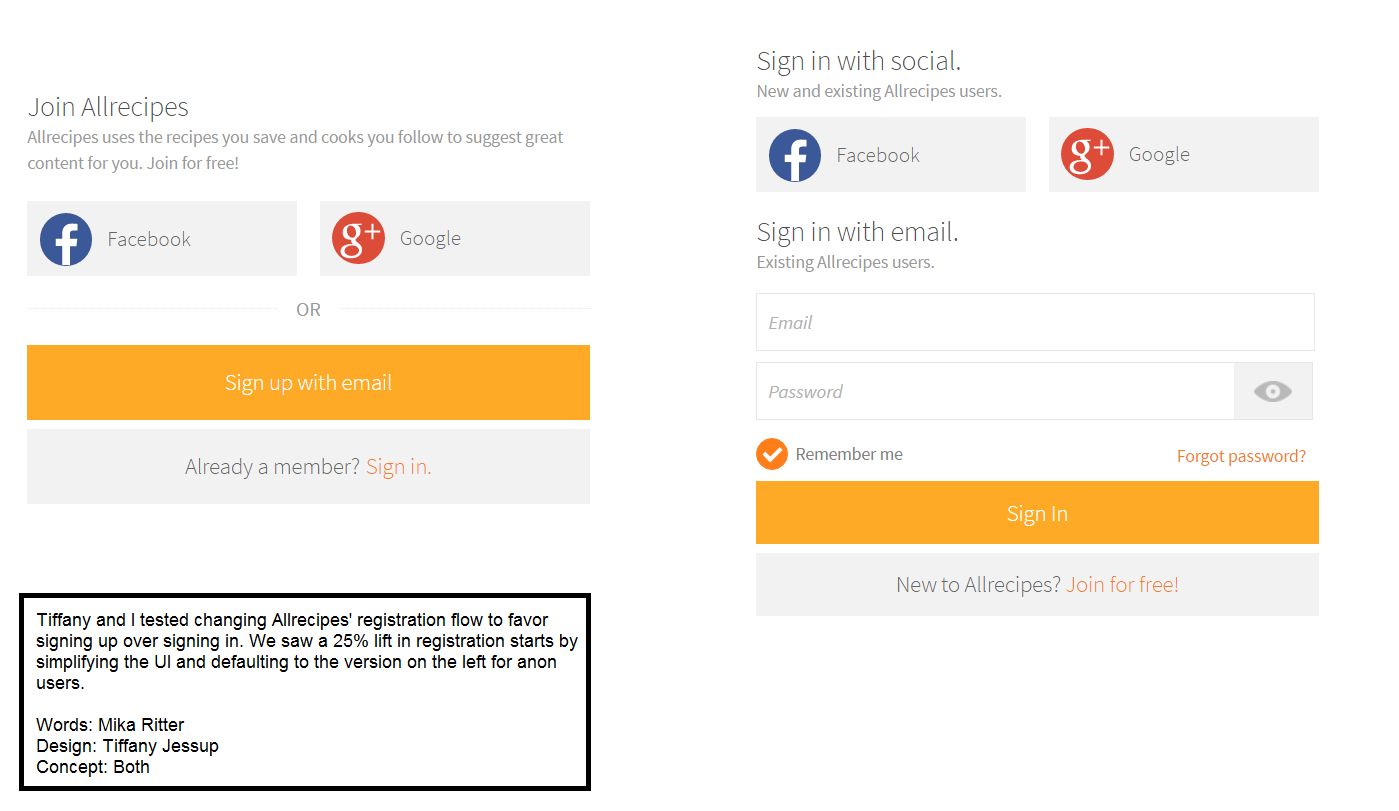
“Allrecipes uses the recipes you save and cooks you follow to suggest great content for you. Join for free!”

Result: We saw a 25% lift in registration starts by simplifying the UI and defaulting to the version on the left for anonymous users.
Allrecipes Join Allrecipes vs Sign In registration flow comparison
Original Artifact: Registration Flow A/B Test (+25% Lift) Words: Mika Ritter • Design: Tiffany Jessup • Concept: Both (click to zoom).

2. Overlays & User Education (2015 Site Redesign)

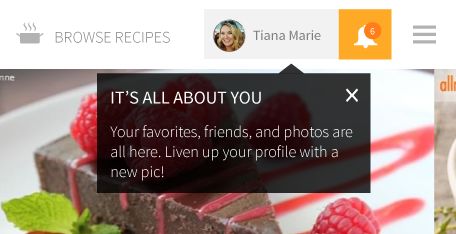
To introduce home cooks to the completely redesigned Allrecipes social feed and profile experience, I wrote welcoming, bite-sized educational overlays and contextual callouts:
Calling all cooks welcome modal
Welcome Modal: “Calling all cooks” “Welcome to the new Allrecipes, where the food you like and friends you follow help us suggest more delicious dishes just for you.”
It's all about you profile tooltip
Profile Tour: “It’s All About You” “Your favorites, friends, and photos are all here. Liven up your profile with a new pic!”
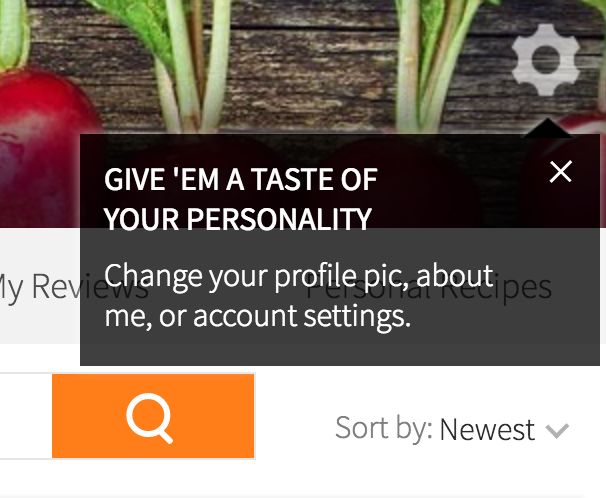
Give 'em a taste of your personality tooltip
Settings Callout: “Give ’Em a Taste of Your Personality” “Change your profile pic, about me, or account settings.”

3. Copywriting & A/B Testing: “the SCOOP” Breakfast Email Campaign

Beyond core UI strings, I drove engagement through playful email and social media campaigns—writing all copy and testing subject lines across millions of subscribers:
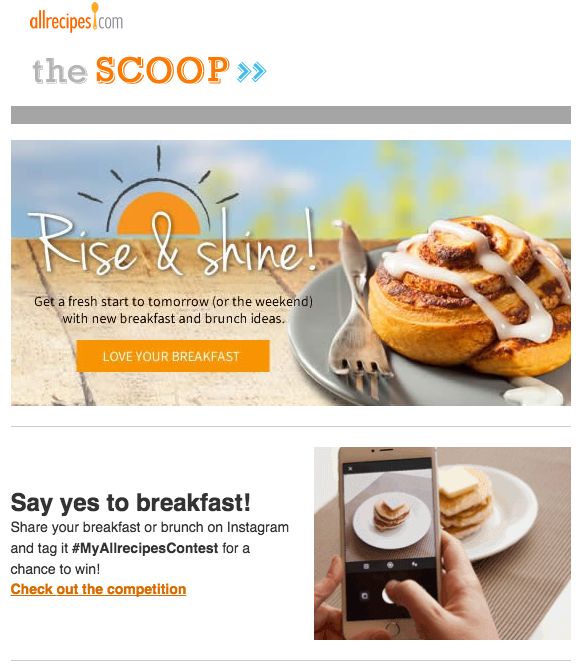
Rise & shine! Say yes to breakfast email hero
Hero & Social Contest “Rise & shine!” + “Say yes to breakfast! Tag #MyAllrecipesContest”
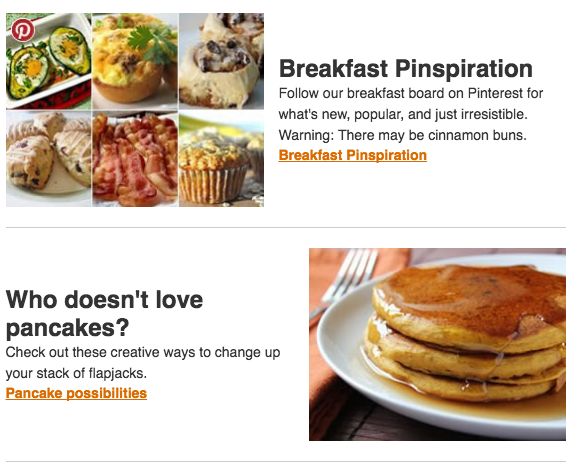
Breakfast Pinspiration and Who doesn't love pancakes?
Pinterest & Flapjacks “Breakfast Pinspiration — Warning: There may be cinnamon buns.”
Breakfast in a blender and Overnight Blueberry French Toast
Smoothies & Video Recipes “Breakfast in a blender” & “Overnight Blueberry French Toast”
Version Winning Subject Line Sent Opens Open Rate Clicks CTR
Version C Best. Breakfast. Ever. 4,171,500 1,146,006 27.47% 203,609 17.77%

4. Allrecipes Dinner Spinner (iOS & Android), Style Guide & Cookware

  • Allrecipes Dinner Spinner (iOS & Android): UX writing for the flagship mobile app’s 3-reel recipe spinner, personalized feeds, and in-app purchases.
  • Allrecipes UI Writing Style Guide: Authored the comprehensive UI style guide to standardize terminology across web and mobile teams.
  • Cooking School, Video Spots & Branded Cookware: Wrote supplemental material for physical branded cookware packaging, Cooking School courses, and usability study scripts.
Allrecipes Dinner Spinner and Style Guide Summary
← Back to Portfolio

Nintendo of America: Animal Crossing: New Leaf & Style Savvy

Bringing heart, humor, and cultural nuance to Nintendo 3DS classics—re-characterizing villager archetypes and localizing thousands of lines of dialogue.

Company & TimelineNintendo of America • Redmond, WA (May 2012 – Apr 2013)
TitleAssociate Localization Writer
Shipped TitlesAnimal Crossing: New Leaf & Style Savvy: Trendsetters
Official CreditCredited as Michaela Ritter (NOA Localization)

Character Voice & Cultural Adaptation at Nintendo Treehouse

As an Associate Localization Writer at Nintendo of America from May 2012 to April 2013, I collaborated with a global team of writers, translators, and game developers to adapt two major Nintendo 3DS titles for North American players:
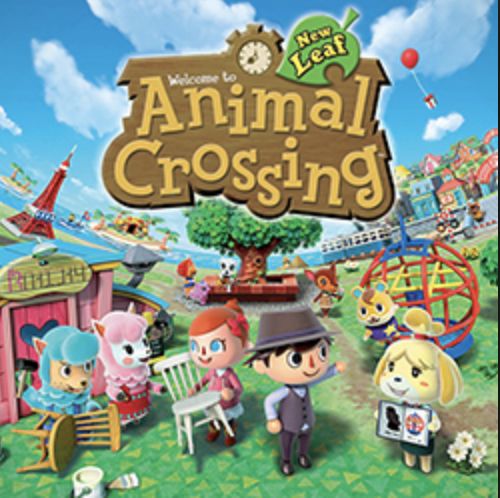
  • Animal Crossing: New Leaf (Nintendo 3DS, Released June 2013): Re-characterized select animal personality types to align with U.S. cultural expectations and mitigate stereotypes. Revised or rewrote all the dialogue for several villager archetypes and key characters, ensuring every conversation felt distinct, warm, and endlessly replayable.
  • Style Savvy: Trendsetters (Nintendo 3DS, Released October 2012): Wrote and localized boutique fashion scenarios, customer personas, and styling dialogue. Fun historical artifact: In the North American release of Style Savvy: Trendsetters, the player’s charismatic boutique mentor (named “Evie” in the European/PAL release) was localized for North America as “Michaela”!
  • Post-Localization Gameplay & QA: Played through builds in-context to catch text overflow, pacing issues, gender/plurality variables, and tonal consistency.
Animal Crossing: New Leaf Box Art
Animal Crossing: New Leaf (Nintendo 3DS) Over 13 million copies sold worldwide; Michaela Ritter is officially credited in the Nintendo of America localization staff roll.
Nintendo Localization Artifact for Animal Crossing: New Leaf and Style Savvy: Trendsetters
Nintendo 3DS Localization & Credits Artifact Click image to inspect the New Leaf villager dialogue & credits and the Style Savvy: Trendsetters “Michaela” localization detail.
← Back to Portfolio

WildTangent: FATE: The Cursed King & Global OEM Campaigns

Five years of narrative scriptwriting, A/B-tested email marketing, OEM partnerships (HP, Toshiba, Acer, T-Mobile), and 10-language localization.

Company & TimelineWildTangent • Redmond, WA (Jul 2007 – May 2012)
RolesCreative Services Lead / Sr. Writer & Support Mgr
Shipped Game ScriptFATE: The Cursed King (Released March 2011)
Global Scope10 Languages + HP/WT Brazil Campaigns

From Global Support Manager to Creative Services Lead & RPG Scriptwriter

I began at WildTangent in July 2007 as Global Customer Support Manager—building the customer support site and internal knowledgebase, managing support localization, and training global support staff—before being promoted in May 2008 to Senior Marketing and Web Writer and Creative Services Group Lead:
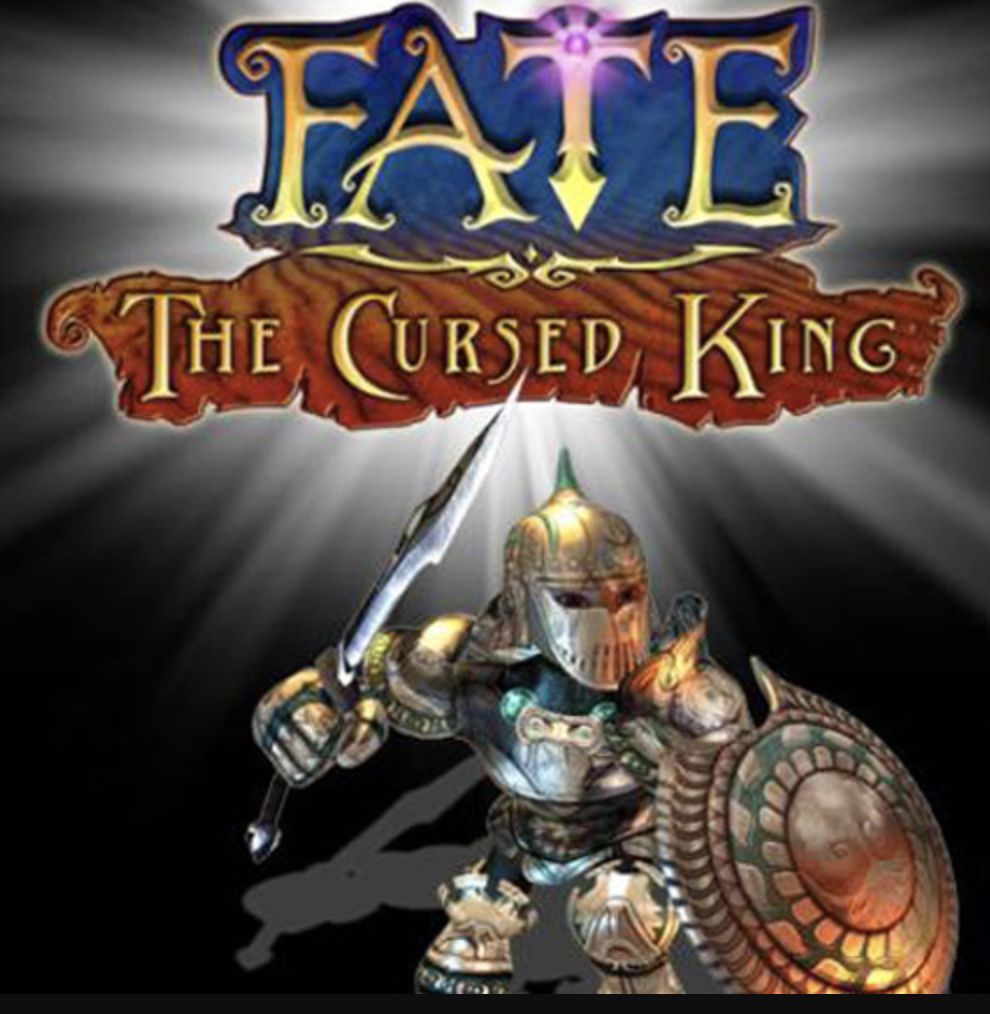
  • Creative/Script Writer for FATE: The Cursed King (2011): Authored the game script, realm lore (the desert city of Ekbatan), quest dialogues, and launch collateral for the fourth installment of WildTangent’s beloved dungeon-crawling action-RPG franchise.
  • Global OEM Partnerships: Served as the creative liaison for partnerships with HP, Acer, Toshiba, and T-Mobile, including acting as primary point of contact for joint WildTangent/HP campaigns in Brazil.
  • WildTangent Style Guide & Storefront Copy: Created the official WT style guide and wrote hundreds of game descriptions, UI messages, newsletters, promotions, landing pages, contests, and print materials.
  • A/B Testing & 10-Language Localization: Led email planning, authoring, A/B testing, and ESP performance analysis, while managing content localization across 10 languages.
FATE: The Cursed King Box Art
FATE: The Cursed King (2011) From Mika’s portfolio deck: official key art for FATE: The Cursed King, for which she wrote the script and collateral material.
WildTangent and FATE: The Cursed King Artifact
FATE: The Cursed King Script & OEM Localization Artifact Click image to enlarge.